IAM
IAM


- Documentation
 IAMUser GuidePermission PolicyPolicy GrammarConditions
 Copy page
 Download PDFCopy pageDownload PDF
**Condition **is an optional element that defines the conditions under which a permission declaration takes effect. The key difference between IAM and RBAC model is that it provides attribute-based access control (ABAC). When defining permissions, it is no longer limited to defining "what subject accesses what object through what operation", but can further access control through the attribute information of the subject and object and the attribute information in the request. Based on this feature, you can define very fine access rights to maximize the security of various complex access scenarios on the cloud. For the current supported conditional keys and instructions for use, please refer to the Condition Condition Key Description ;forthesupportofCloudasaServiceforCondition,pleaserefertoListofConditionKeysSupportedbyCloudasaService
request context
The API requests for users to access Cloud as a Service contain rich request context information, which can be classified into "identity attributes" (subject attributes), "resource attributes" (object attributes), "request attributes", and "environment attributes".
Identity Attributes: Attributes of the requested identity, such as PrincipalTag (identity tag), PrincipalTrn (identity resource identifier);
Request properties: The operation information on the resource is defined in the request, which is generally passed through the request parameters. Request parameters are divided into public and non-public parameters. Public parameters are required in the construct signature request (see API Calling Guide - Public Parameters ). Non-public parameters are API parameters provided by Cloud as a Service, usually placed in Query or Body for passing, such as RequestTag (request tags attached to cloud resources);
Environment Attributes: Environmental information at the time of the request, such as IP (Internet Protocol Address accessed);
Resource properties: Properties on a resource, such as a ResourceTag.
Permission policy
Attribute-based access control for IAM is defined through the Condition element in the policy declaration. Here is an example of a policy with Condition:
{
  "Statement": [
    {
      "Effect": "Allow",
      "Action": [
        "alb:*"
      ],
      "Resource": [
        "*"
      ],
      "Condition": {
        "IpAddress": {
          "volc:SourceIp":"8.8.8.8"
        }
      }
    }
  ]
}
Interpretation: This policy restricts access to all Application Load Balancer operations only from Internet Protocol Address 8.8.8.8 (for example, not a real IP).
tip
Special cases: The policy syntax and functional logic of Volcano Engine Object Storage (TOS) may be different. To configure Condition permissions for object storage, please refer to the help documentation for object storage > > #%E6%9D%A1%E4%BB%B6%E8%AF%B4%E6%98%8E.
A single condition in the policy consists of **Operator (operator) **, **Condition Key (condition key) **, and **Condition Value (condition value) **. For a multi-valued Condition Key, you need to add a multi-valued matcher before the Operator. When it is determined that the condition needs to satisfy the premise that the Condition Key exists in the request context, the IfExists operator needs to be added before the Operator.
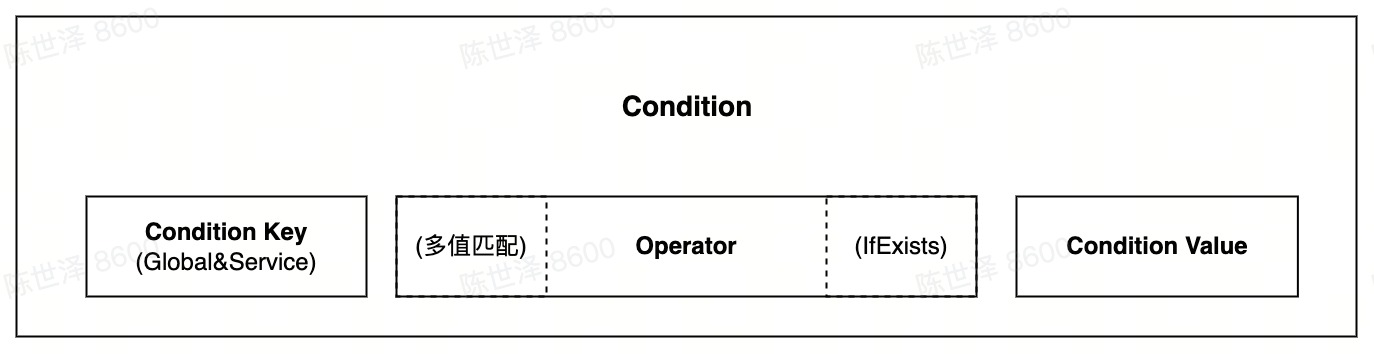
Take the following condition as an example, StringEquals is Operator, volc: RequestTag/apartment is Condition Key, and Finance is Condition Value:
{
      "Condition": {
        "StringEquals": {
          "Volc: RequestTag/apartment": "Finance"
        }
      }
}
In a policy declaration, there can be multiple conditions, and a condition can have multiple pairs of condition keys. Each condition key can correspond to multiple condition values (expressed as an array), for example:
{
      "Condition": {
        "StringEqualsIgnoreCase": {
          "Volc: RequestTag/apartment": ["Finance", "Administration", "R & D"],
          "Volc: ResourceTag/project": ["Game project", "Short video project"]
        },
        "IpAddress": {
          "volc:SourceIp": "203.0.113.0/24"
        }
      }
}
Condition operation logic can refer to the following figure:
- AND stands for the "logical AND" relationship, and OR stands for the "logical OR" relationship.
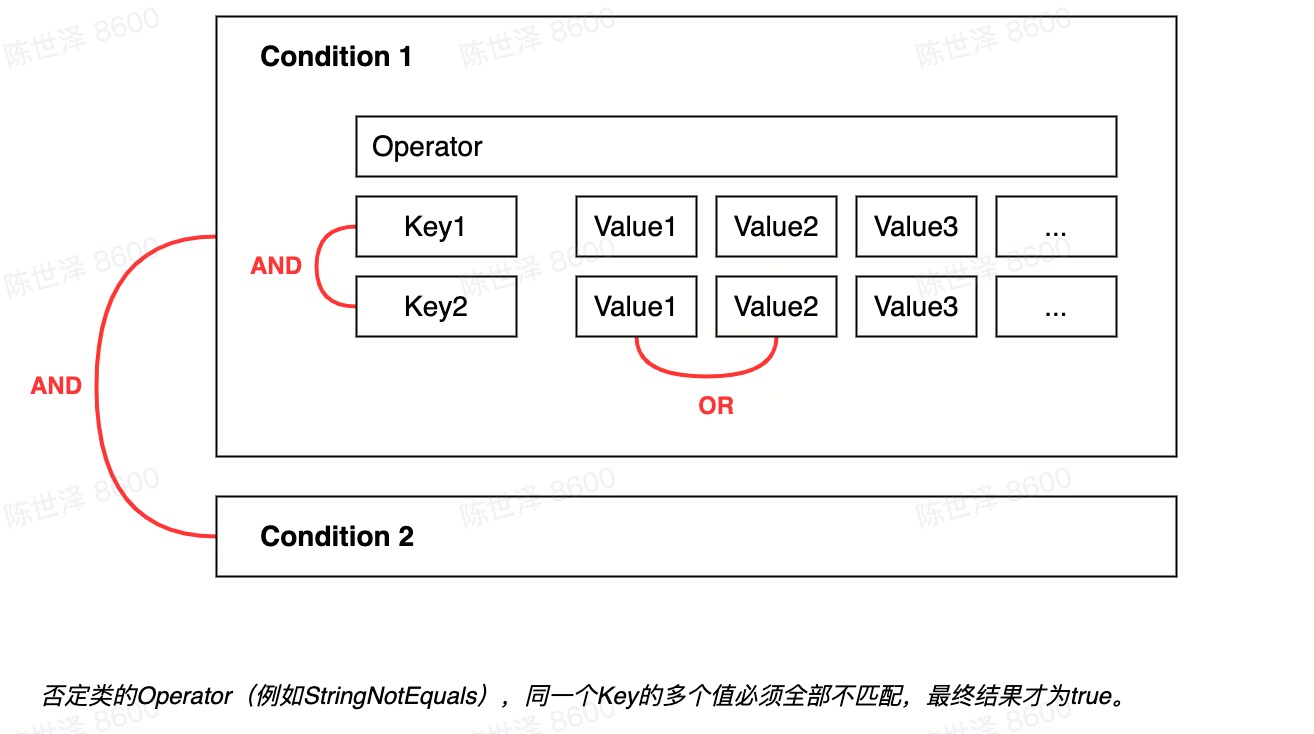
In the above policy example, the composition of Condition is as follows: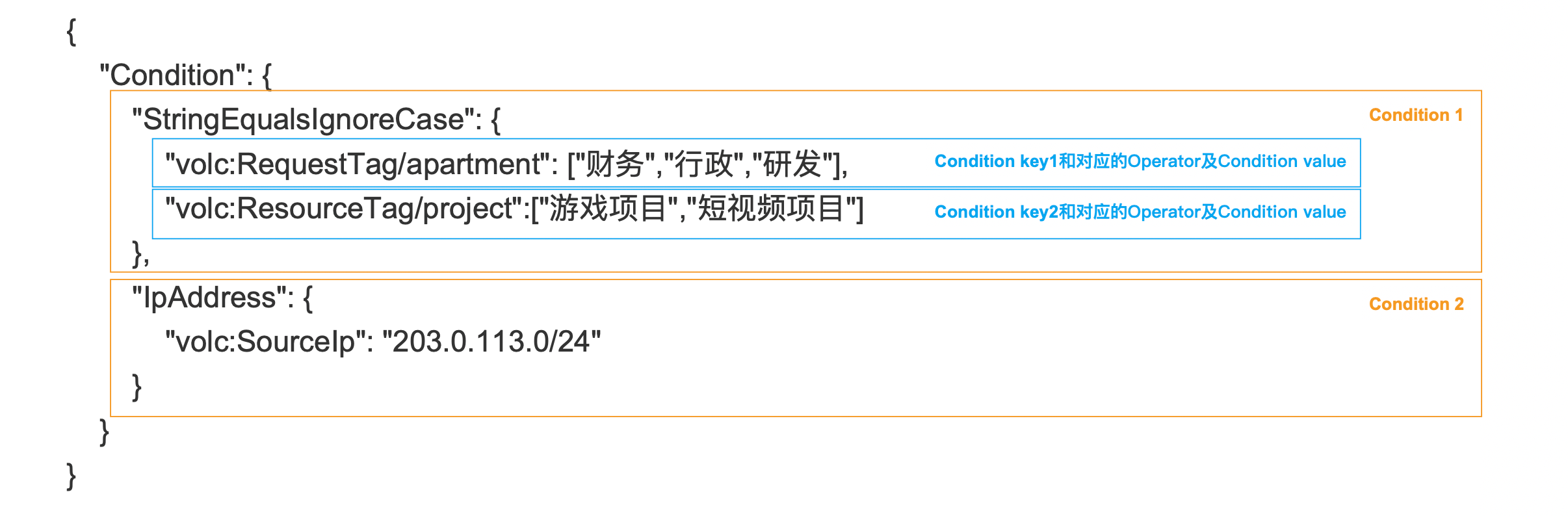
Operator
Refers to conditional operators, such as StringEquals for string exact matches. Operators include primitive operators and operation modifiers. The ++ operator is case-sensitive, so you need to ensure that ++ is written correctly in the policy.
Basic Operators
The basic operators supported are as follows:
| < div style = "width: 100px" > Operator type | Operator type description | < div style = "width: 180px" > operator | Operator Description | |
|---|---|---|---|---|
| String | String operation | StringEquals | String exact match (case sensitive) | \ |
| StringNotEquals | String exact mismatch (case sensitive) | |||
| StringEqualsIgnoreCase | String exact match (ignore case) | |||
| StringNotEqualsIgnoreCase | String mismatch (case ignored) | |||
| StringLike | String fuzzy match (case sensitive) (the symbol * or? is treated as a wild-card when using this operator, and as a normal character when using StringEquals) | |||
| StringNotLike | String fuzzy mismatch (case sensitive) (symbols * or? are treated as wild-cards when using this operator, and as normal characters when using StringNotEquals) | |||
| IP Address | Internet Protocol Address Operation | IpAddress | Internet Protocol Address or Address Segment Matching | \ |
| (IP v4 or IP v6, address segment supported) | ||||
| NotIpAddress | Internet Protocol Address or Address Segment Mismatch | |||
| Numeric | number operation | NumericEquals | The value is equal to | \ |
| (Integer or Decimal) | \ | |||
| NumericNotEquals | The value is not equal to | |||
| NumericLessThan | The value is less than | |||
| NumericLessThanEquals | Value less than or equal to | |||
| NumericGreaterThan | The value is greater than | |||
| NumericGreaterThanEquals | Value greater than or equal to | |||
| Date and time | date and time arithmetic | DateEquals | Date time is equal to | \ |
(UTC time, accurate to the second, supports ISO 8601 standard format: YYYY-MM-DD THH: MM: SS'Z ' or UNIX timestamp, e.g. 2023-08-30 T23:59:59Z) | \ | |||
| DateNotEquals | Date time is not equal to | |||
| DateLessThan | Date time is earlier than | |||
| DateLessThanEquals | Date time no later than | |||
| DateGreaterThan | Date time is later than | |||
| DateGreaterThanEquals | The date and time are no earlier than | |||
| Boolean | Boolean operation | Bool | Boolean matching (true or false) | \ |
| (True or false) | ||||
| TRN | Global Resource Name (TRN) operation | TrnEquals | TRN exact match (case sensitive). TRN can include wild-cards, which are the same as StringLike in matching logic, but when using TrnEquals, the system will check the validity of the format of the Condition value | \ |
| TrnNotEquals | TRN exact mismatch (case sensitive). TRNs can include wild-cards, which are the same matching logic as StringNotLike, but when using TrnNotEquals, the system will check the validity of the format of the Condition value | |||
| Null | conditional key existence operation | Null | Checks whether the condition key exists in the request context and returns true if it does not exist and false if it does. When using this operator, the Condition value must be true or false to compare the results of the Null check | \ |
| (The matching value is true or false) |
operation modifier
IfExists modifier
In some scenarios, the condition key may not exist in the request context. When you want the condition key to not exist to skip the match, you can add the IfExists modifier in the Operator. For example, the following conditions represent that when the request context contains the volc: UserName condition key, only when the condition value is equal to bob can be matched; when the request context does not contain the volc: UserName condition key, the condition can be directly matched:
{
      "Condition": {
        "StringEqualsIfExists": {
          "volc:UserName":"bob"
        }
      }
}
multi-valued modifier
In some scenarios, the same attribute may have multiple attribute values in the request context. At this time, it is necessary to use multi-valued modifiers to define multi-valued match types. Multi-valued modifiers include ForAllValues and ForAnyValue :
- ForAllValues : The condition key must be included in the request context and all condition values are matched (note: when the unconditional value is the empty set, the empty set is a subset of any set, so it can also be matched);
- ForAnyValue : The request context must contain a conditional key and at least one conditional value matches.
For example, the following condition uses both IfExists and ForAnyValue , which means that when the request passes the label (RequestTagKeys), the label key must be "department" ( IfExists let the case of not passing the label can still be matched by the condition, ForAnyValue When requiring multiple pairs of labels to be passed in the request, each pair of label keys must be equal to "department". Since the label key cannot be repeated at the time of request, this condition is equivalent to restricting the user to only pass the label with the label key "department" if the label is passed).
{
      "Condition": {
        "ForAnyValue:StringEqualsIfExists": {
          "volc:RequestTagKeys": "department"
        }
      }
}
Condition key
The condition key specifies the attribute field to be computed in the request context, such as volc: PrincipalTrn (TRN representing the identity of the request). The identity attribute, the public parameter part in the request attribute, and the environment attribute are usually used as the **global condition key **, and the non-public parameter part in the request attribute and the resource attribute are usually used as the **service condition key **.
- The conditional key format is
${ServiceCode}: ${ConditonKeyName}, $ {ServiceCode} is the service of the specific Cloud as a Service, and the global conditional key uses the'volc 'keyword (that is, the format is'volc: ${ConditionKeyName}'). ++ Condition keys are case-sensitive, you need to ensure that ++ is written correctly in the policy. - Some condition keys may have multiple values in the context of each request, and such condition keys are called multi-valued type condition keys; some condition keys may have at most one value in the context of each request, and such condition keys are called single-valued type condition keys. Conditional keys of multi-valued types require the use of multi-valued modifiers (refer to the Operational Modifiers section above).
tip
Some attribute values are themselves key-value structures, and the key in the attribute value can be used as part of the Condition key. For example volc: RequestTag/${TagKey} (where ${TagKey} needs to be substituted for the specific label key).
The following are the conditional keys and descriptions for access control support:
| < div style = "width: 185px" > Conditional keys | < div style = "width: 400px" > Description | < div style = "width: 120px" > Existence | < div style = "width: 50px" > Value type | < div style = "width: 100px" > Supported operators | |
|---|---|---|---|---|---|
| volc:RequestedRegion | The requested Region, such as cn-Beijing. Policy example | All requests exist | single value | String | |
| volc:CurrentTime | The requested time, using UTC time, is accurate to the second, and supports the standard format following ISO 8601: YYYY-MM-DD T'HH: MM: SS'Z ' or UNIX timestamp, such as 2023-08-30 T23:59:59Z . Policy example | All requests exist | single value | Date and time | |
| volc:SourceIp | The requested IP address. Supports IP v4 and IP v6, supports address segments. Note: This condition key supports the public Internet Protocol Address and the VPC intranet address ++ in the two regions of cn-Beijing and cn-Shanghai (other regions are being supported one after another). Policy example | All requests exist | single value | IP Address | \ |
| volc:ViaConsole | Whether the request originated from the console, true represents login console access, and false represents the programming request API. Policy example | All requests exist | single value | Boolean | \ |
| volc:UserName | The user name of the requested IAM child user. Policy example | Exists when a sub-user makes a request directly using IAM | single value | String | |
| volc:PrincipalTrn | The TRN of the requested identity. Policy example | Exists when requesting an in-account IAM identity | single value | Strings and TRNs | \ |
| \ | |||||
| - User identity access (including user sso): trn: iam:: $ {AccountId}: user/ ${UserName} | \ | ||||
| \ | |||||
| Temporary credential access after role play (including role sso): trn: iam:: $ {AccountId}: role/ ${RoleName} | \ | ||||
| \ | |||||
| - Root user identity access (must be the main account/root user access, child user, role and other identity access in the main account are not within the effective scope): trn: iam:: ${AccountId}: root | |||||
| volc:RequestTagKeys | All label keys for request delivery, including labels for request delivery involving label attachment or label release, excluding labels passed when the query interface filters by label. Policy example | There are requests involving label attachment and label removal | multi-value | String | |
volc:RequestTag/tag_key | The label key in the label passed during the request is the label value of the tag_key , including the label passed during the request involving label addition or label release, and does not include the label passed when the query interface filters by label. Policy example | There are requests involving label attachment and label removal | single value | String | |
volc:PrincipalTag/tag_key | The tag key in the requested IAM identity tag is the tag value of the tag_key . Policy example | Exists when accessing with an IAM child user or role | single value | String | \ |
| \ | |||||
| - When a user accesses directly, PrincipalTag is a label bound to the user | \ | ||||
| \ | |||||
| - When the user accesses as a role, the PrincipalTag is the label bound on the Role + the Session Tag (when there is a duplication of the TagKey on the Role and the TagKey of the Session Tag, the Session Tag will overwrite the Role Tag) | |||||
volc:ResourceTag/tag_key | The tag key in the tag of the resource requesting access is the tag value of the tag_key . This condition requires that the resource ID must be passed in the request. For some list class interfaces, if the request does not pass the resource ID, it represents the query of all resources. At this time, the request will not be authenticated. If you need to query the resource list, it is recommended not to set the condition for the list interface alone. Policy example | The requested cloud resource that supports the tag exists | single value | String |
Condition value
Conditional values limit the range of attribute values required for a successful match to take effect. Conditional values can be arrays, and multiple values in the array are "logical or" matches. Wild-card is supported within conditional values:
- Wild-card
*: Matches 0, 1, or more characters. - Wild-card
?: Matches one character (cannot be 0).
