IAM
IAM


- Documentation
 IAMUser GuideIdentitiesSingle Sign-onUser SSOUser SSO Overview
 Copy page
 Download PDFCopy pageDownload PDF
User SSO means that after establishing a mutual trust relationship between the enterprise's own identity management system as the IdP and the Volcano Engine as the SP, the user can access the Volcano Engine as a corresponding IAM user after logging in through the enterprise's own identity management system.
User SSO applies to:
Your resource rights management in Volcano Engine has been configured based on the rights of IAM users. You hope to achieve permission control of cloud resources by corresponding to the corresponding IAM user through the enterprise IdP user identity.
You want to simplify custom configuration of your IdP, or you don't have a business requirement to use role SSOs.
Some of the products you purchased with Volcano Engine do not support IAM role identity use, but only support sub-users. You want to be able to support sub-users who use this type of product to implement enterprise IdP single sign-on.
User SSO supports docking based on SAML 2.0 and OAuth 2.0 protocols.
1.1 SAML SSO basic process
Taking the SAML protocol as an example, the flowchart of an SSO is as follows: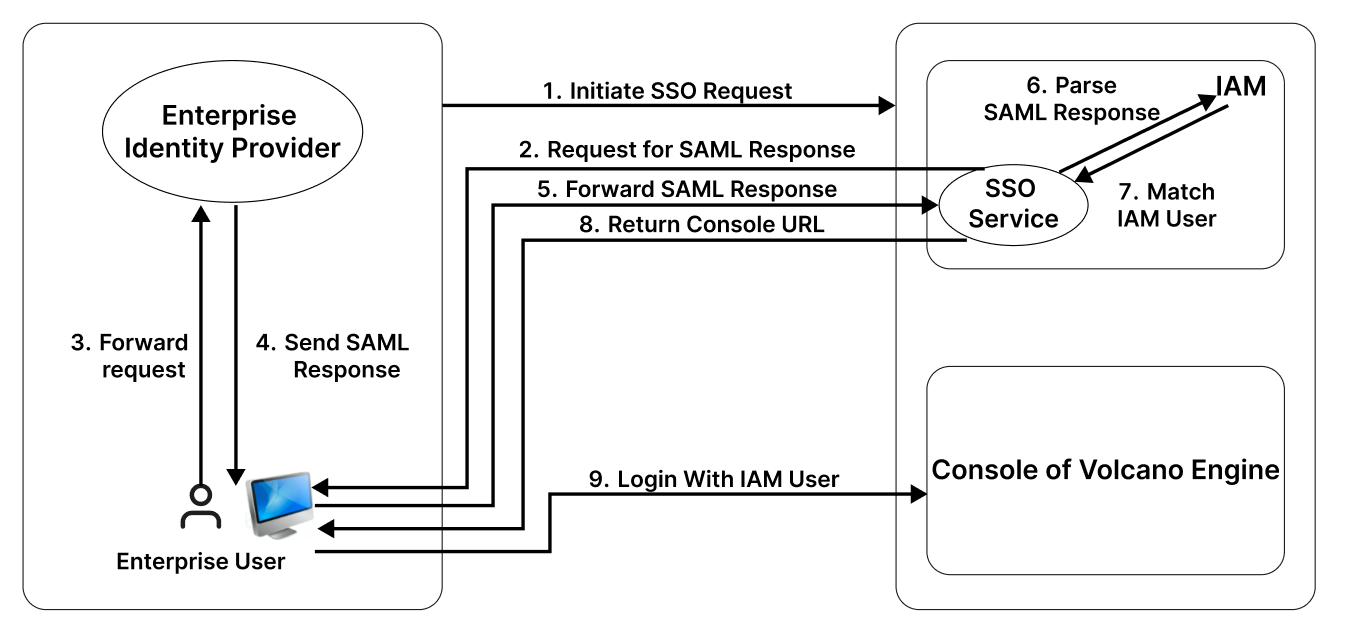
Enterprise user browsers initiate single sign-on requests directly through the Volcano Engine login interface or through a third-party IdP login interface link.
The Volcano Engine SSO service sends SAML Requests to enterprise user browsers.
Enterprise user browsers forward SAML assertion requests.
The IdP authenticates the logged-in user and sends a SAML assertion containing the IAM user information corresponding to the enterprise user.
Enterprise user browsers forward SAML assertions to the Volcano Engine SSO service.
The SSO service parses the SAML and verifies the authenticity of the SAML assertion through the SAML mutual trust configuration.
After the SAML is parsed, it matches the corresponding IAM user through its internal information.
The Volcano Engine SSO service returns the Volcano Engine console URL to the enterprise user's browser.
Enterprise user browser redirection, enterprise users log in to the Volcano Engine console using the corresponding IAM user identity.
1.2 Basic steps for SAML configuration
In order to realize user SSO, it is necessary to configure the mutual trust relationship between IdP and SP, and establish the corresponding relationship between enterprise IdP users and IAM users.
First configure the enterprise IdP as a trusted identity provider for Volcano Engine. Please refer to the SAML 2.0 user SSO configuration for the Volcano Engine . Please note that only one user SSO type identity provider is supported under a single Volcano Engine account.
Secondly, Volcano Engine is configured as a SP as a trusted service provider for the enterprise IdP. Please refer to SAML 2.0 User SSO Configuration for Enterprise IDPs .
Before initiating user SSO, you need to create a corresponding IAM user within Volcano Engine, refer to user management . Then configure the SAML assertion content at the enterprise IdP to complete the mapping of the final IAM user and enterprise user. Please refer to SAML 2.0 User SSO Configuration for Enterprise IDPs .
When logging in, enter the SSO login interface and select User SSO to log in to the Volcano Engine console using that IAM user identity.
