Volcengine Kubernetes Engine
Volcengine Kubernetes Engine


- Documentation
 Volcengine Kubernetes EngineVolcengine Kubernetes EngineSolutionSetting up refined cloud workflows based on Argo Workflows and Serverless Kubernetes
 Copy page
 Download PDFCopy pageDownload PDF
Argo Workflows is a cloud-native Kubernetes based open source workflow engine implemented through Kubernetes CRD. It is often used to orchestrate parallel workflows on Kubernetes clusters, and each task in the workflow is implemented as a container to run independently, which is lightweight, scalable and easy to use.
Argo Workflows are commonly used in the following application scenarios:
- **Batch processing and data analytics **. The data collected by the enterprise generally needs to be processed before it can be used. Argo Workflows allows developers to perform the entire process of batch processing in the Kubernetes cluster, and periodically automate the processing of a large number of repetitive data jobs.
- **AI model training **. Model training usually involves a standardized process: data collection, data preprocessing, model construction, model compilation, model training, and model evaluation. This process can also be automated in Kubernetes clusters through Argo Workflows, thus achieving effective control of resource costs;
- **Automation of infrastructure **. Argo Workflows can also be used to automate infrastructure processes, such as automatically managing cloud resource provisioning, to reduce operational complexity and make developers more productive.
With the advent of a new generation of artificial intelligence represented by generative artificial intelligence, more and more enterprises are beginning to apply AI model capabilities to various industries. Argo Workflows are also being used in HPC, image processing, simulation computing, game AGI, autonomous driving data processing, scientific computing, and other fields. This article describes how to run Argo Workflows in Volcano Engine Container Service VKE and Elastic Container VCI .
Background information
Volcano Engine Elastic Container Instance VCI (Volcengine Container Instance) is a serverless and containerized computing service launched by the cloud native team based on the in-depth practice of ByteDance.
In enterprise-level scenarios, because multiple independent workflows can be executed concurrently in a short period of time, the tasks in each workflow execution often complete a specific operation, and the running time varies greatly. Argo Workflows usually have **high resource elasticity requirements **for the underlying container environment. Elastic container VCI has the advantages of second-level startup, high concurrency creation, and sandbox container security isolation, allowing users to pay only for the "actual running time of the business" of the computing resources used ( high packing rate ),whichisnaturallysuitableforsupportingArgoWorkflowsinvariousscenarios(www.volcengine.com/docs/6460/76908.)
Elastic container VCI environment preparation
First, log in to the Volcano Engine console. Since Elastic Container VCI is a service in Container Service VKE , you can create a cluster in Container Service VKE by referring to the following documentation: https://www.volcengine.com/docs/6460/70626 .
This article takes the VPC-CNI network model cluster as an example. For instructions on using VCI in a Flannel network model cluster, see Using VCI in a Flannel network model cluster .
Installing Argo Workflows
Follow the community documentation to install Argo Workflows: https://argoproj.github.io/argo-workflows/installation/
Argo Workflow experience environments can be quickly deployed in the following ways:
kubectl  apply -n argo -f https://github.com/argoproj/argo-workflows/releases/download/v3.5.5/install.yaml
customresourcedefinition.apiextensions.k8s.io/clusterworkflowtemplates.argoproj.io created
customresourcedefinition.apiextensions.k8s.io/cronworkflows.argoproj.io created
customresourcedefinition.apiextensions.k8s.io/workflowartifactgctasks.argoproj.io created
customresourcedefinition.apiextensions.k8s.io/workfloweventbindings.argoproj.io created
customresourcedefinition.apiextensions.k8s.io/workflows.argoproj.io created
customresourcedefinition.apiextensions.k8s.io/workflowtaskresults.argoproj.io created
customresourcedefinition.apiextensions.k8s.io/workflowtasksets.argoproj.io created
customresourcedefinition.apiextensions.k8s.io/workflowtemplates.argoproj.io created
serviceaccount/argo created
serviceaccount/argo-server created
role.rbac.authorization.k8s.io/argo-role created
clusterrole.rbac.authorization.k8s.io/argo-aggregate-to-admin created
clusterrole.rbac.authorization.k8s.io/argo-aggregate-to-edit created
clusterrole.rbac.authorization.k8s.io/argo-aggregate-to-view created
clusterrole.rbac.authorization.k8s.io/argo-cluster-role created
clusterrole.rbac.authorization.k8s.io/argo-server-cluster-role created
rolebinding.rbac.authorization.k8s.io/argo-binding created
clusterrolebinding.rbac.authorization.k8s.io/argo-binding created
clusterrolebinding.rbac.authorization.k8s.io/argo-server-binding created
configmap/workflow-controller-configmap created
service/argo-server created
priorityclass.scheduling.k8s.io/workflow-controller created
deployment.apps/argo-server created
deployment.apps/workflow-controller created
In Argo Workflows, argoexec is used to assist the sidecar running the task Pod. By default, argoexec will pull the image from argoproj/argoexec: < version >. Because of the instability of domestic access to overseas resources, you can modify the workflow-controller-configmap configuration items of Argo Workflows and set the sidecar container to pull the image from the image warehouse of Volcano Engine to reduce the image pulling time and improve the running efficiency of the Pod.
The workflow-controller-configmap configuration items you can refer to are as follows:
apiVersion: v1
data:
  executor: |
    imagePullPolicy: IfNotPresent
    image: paas-cn-shanghai.cr.volces.com/argoproj/argoexec:v3.5.5
    resources:
      requests:
        cpu: 0.1
        memory: 64Mi
      limits:
        cpu: 0.5
        memory: 512Mi
kind: ConfigMap
metadata:
  name: workflow-controller-configmap
  namespace: argo
Running Argo Workflows tasks with VCI
This example refers to the community documentation to create a very simple workflow template:
apiVersion: argoproj.io/v1alpha1
kind: Workflow
metadata:
  generateName: argo-vci-demo-
spec:
  entrypoint: hello-hello-hello
  templates:
  - name: hello-hello-hello

    steps:
    - - name: hello1
        template: whalesay
        arguments:
          parameters:
          - name: message
            value: "hello1"
    - - name: hello2a
        template: whalesay
        arguments:
          parameters:
          - name: message
            value: "hello2a"
      - name: hello2b
        template: whalesay
        arguments:
          parameters:
          - name: message
            value: "hello2b"
  - name: whalesay
    inputs:
      parameters:
      - name: message
    container:
      image: paas-cn-shanghai.cr.volces.com/argoproj/whalesay:latest
      command: [cowsay]
      args: ["{{inputs.parameters.message}}"]
The workflow execution process is completed by running multiple task pods. We recommend using Elastic Container VCI because offline tasks that use the Cloud as a Service are often difficult to make good use of node resources and generate waste:
- The demand for computing resources (CPU, memory, etc.) for different tasks **varies greatly **: Due to the fixed CPU and memory specifications of Cloud as a Service, it is difficult to "perfectly match" the cloud resources provided and the actual cloud resources required in many cases, resulting in excess computing resources (and cannot be used by other tasks), resulting in a low overall resource packing rate;
- Different offline tasks run **different start and end times **: This causes Cloud as a Service to generate resource "fragmentation", that is, small pieces of unused resources are distributed across different Cloud as a Service devices and are difficult to be effectively utilized by new offline tasks;
- In some business scenarios, there are **dependencies or priority differences **between offline tasks: this means that some tasks often need to wait for other tasks to complete before starting, and this dependency further exacerbates the challenge of Cloud as a Service resource utilization.
The Volcano Engine elastic container VCI allows users to pay for the computing resources occupied by the actual running business without any idle waste of resources, which can help users greatly improve the packing rate, reduce cloud costs, and reduce the burden of operation and maintenance (see " Faced with cost reduction and efficiency, how to effectively improve the packing rate? ".Atthesametime,theelasticcontainerVCIcanalsoprovideuserswithamoreflexibleexperiencebyprovidingsufficientcomputingpowerduringpeakbusinessperiodsandpullingupcontainersinsecondsincombinationwiththeimagecache.)
Below, we enumerate three ways to execute sample workflows by running Argo Workflows through Volcano Engine Elastic Container VCI.
Method 1: Specify the task Pod through podMetadata to run with VCI
For pods that need to be run in VCI mode, Elastic Container VCI supports specifying instance specification families and subnets through specific annotations. Please refer to the documentation: https://www.volcengine.com/docs/6460/76917 .
We can automatically add corresponding annotations to the podMetadata created by the workflow by setting the podMetadata information in the workflow template. Let the VKE scheduler schedule task pods to run in elastic containers.
apiVersion: argoproj.io/v1alpha1
kind: Workflow
metadata:
  generateName: argo-vci-demo-
spec:
  entrypoint: hello-hello-hello

  # This spec contains two templates: hello-hello-hello and whalesay
  templates:
  - name: hello-hello-hello
    # Instead of just running a container
    # This template has a sequence of steps
    steps:
    - - name: hello1
        template: whalesay
        arguments:
          parameters:
          - name: message
            value: "hello1"
    - - name: hello2a
        template: whalesay
        arguments:
          parameters:
          - name: message
            value: "hello2a"
      - name: hello2b
        template: whalesay
        arguments:
          parameters:
          - name: message
            value: "hello2b"

  - name: whalesay
    inputs:
      parameters:
      - name: message
    container:
      image: paas-cn-shanghai.cr.volces.com/argoproj/whalesay:latest
      command: [cowsay]
      args: ["{{inputs.parameters.message}}"]
#  podGC:
#strategy: OnPodCompletion #After the task Pod is executed, the completed Pod will be deleted
  podMetadata:
    annotations:
 vke.volcengine.com/burst-to-vci:  enforce
      vke.volcengine.com/preferred-subnet-ids: subnet-5g1mi8e6aby873inqlbgzmar,subnet-22jvxc4z6vthc7r2qr1q8g9x4,subnet-22jvxceucg3cw7r2qr17sj10n
vci.vke.volcengine.com/preferred-instance-family: vci.u1 #Specifies the specification family of VCI
Submit Argo Workflows to execute on the command line:
argo submit -n argo argo-vci-demo.yaml --serviceaccount argo
Soon you can see the execution of tasks from the Argo Workflows web console
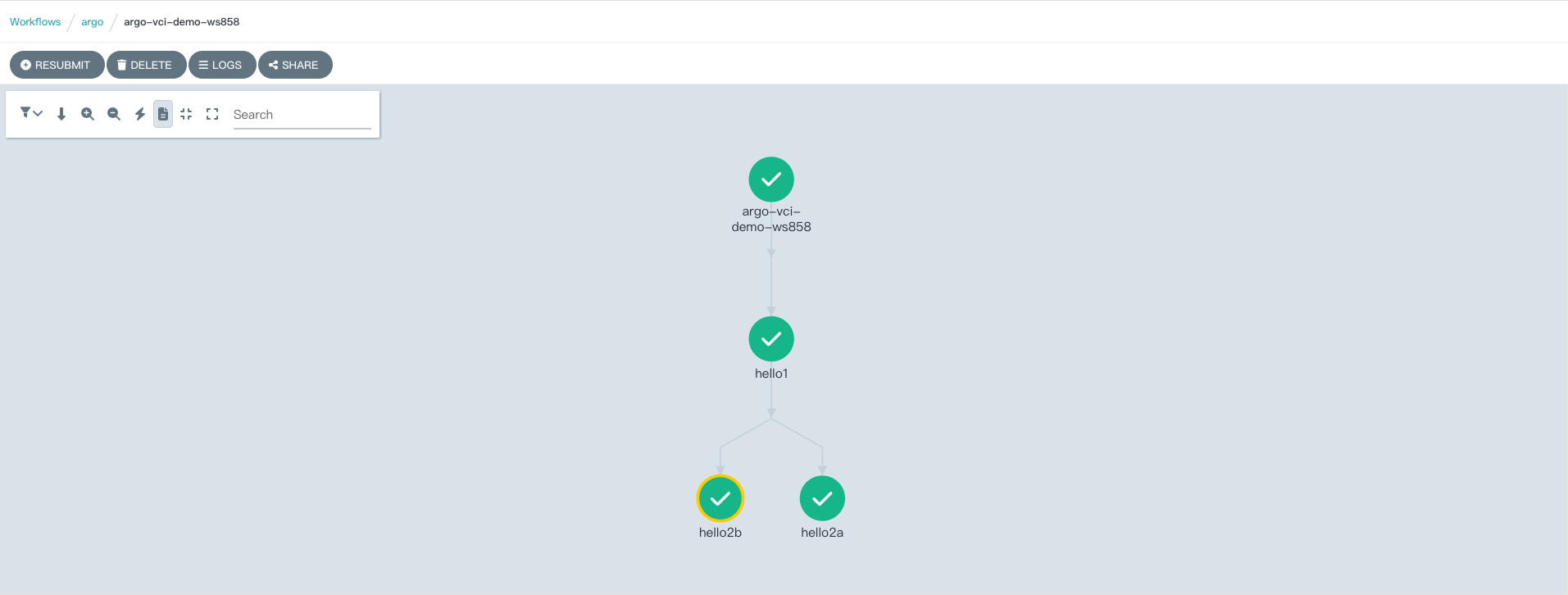
You can also see the creation and execution of pods corresponding to tasks from the console of the Volcano Engine container service. You can see that each pod that executes a task has a VCI identifier, indicating that these pods are executed using elastic container instances.
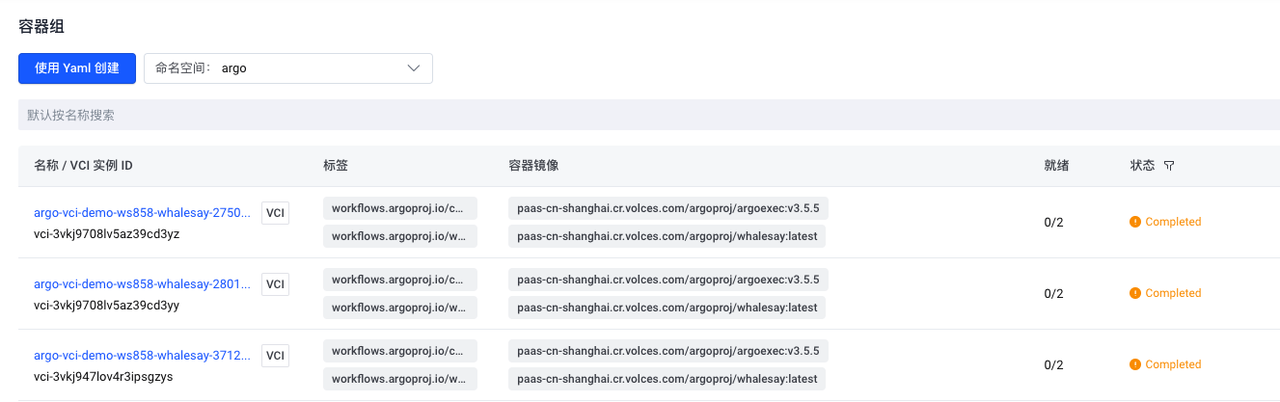
By default, Argo Workflows keeps information about pods in the container environment. In an environment with a large number of workflows, this retained information can consume a large amount of storage space and increase the difficulty of operation and maintenance.
We can set the podGC strategy to OnPodCompletion in the workflow template. The pods created by the workflow are automatically deleted when they are completed.
podGC:
Strategy: OnPodCompletion #After the task Pod is executed, the completed Pod will be deleted
  podMetadata:
    annotations:
      vke.volcengine.com/burst-to-vci: enforce
      vke.volcengine.com/preferred-subnet-ids: subnet-5g1mi8e6aby873inqlbgzmar
vci.vke.volcengine.com/preferred-instance-family: vci.u1 #Specifies the specification family of VCI
Method 2: Implement VCI Scheduling through Resource Policy of VKE Container Service
The Volcano Engine container service provides an elastic resource priority scheduling policy that supports the custom resource definition policy (ResourcePolicy), which sets the order in which workload pods are elastically scheduled to different types of nodes (e.g. package-month ECS, pay-per-use ECS, virtual nodes).
Reference online documentation: Elastic Resource Priority Scheduling -- Container Services - Volcano Engine
We can create the corresponding resource policy in the running space of the workflow, and select the Pod with the specified label to run according to the predetermined resource priority by setting the label selector in the resource policy, so as to realize the flexible scheduling of the Pod related to the workflow between the cluster resident node (ECS node) and the elastic container according to the business needs or resource conditions.
The container cluster of this example has a default node pool, node pool ID: pcodl592d75mk89oame6g, and there is a small size resident ECS node in the node.
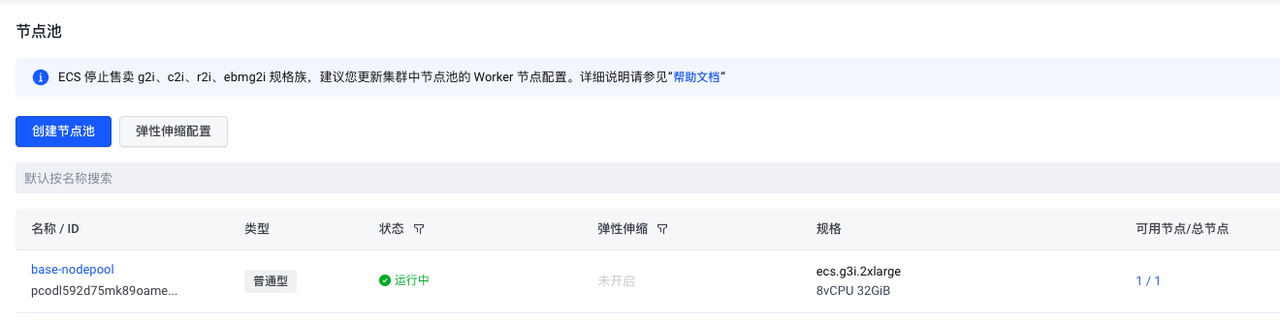
Create a Resource Policy in the Argo namespace and have pods with the resource: vci label optimally scheduled to run in an elastic container.
apiVersion: scheduling.vke.volcengine.com/v1beta1
kind: ResourcePolicy
metadata:
Name: vke-resourcepolicy #ResourcePolicy object name.
Namespace: argo #ResourcePolicy belongs to the namespace. The namespace must be the same as the scheduled Pod namespace.
spec:
Selector: #Label selector for pods managed by ResourcePolicy.
    resource: vci
Subsets: #Resource pool configuration.
- name: ecs-pool #resource pool name.
maxReplicas: 5 #The maximum number of pods scheduled to this resource pool.
maxReplicasRatio: "0.1" #The pods scheduled to the resource pool account for the proportion threshold of all pods. When the threshold is exceeded, pods will no longer be dispatched to the resource pool.
whenNotReachMax: ScheduleAnyWay #scheduling policy, there are two values of DoNotSchdedule and ScheduleAnyWay.
    nodeSelectorTerm:
- key: cluster.vke.volcengine.com/machinepool-name #resource pool label key, the machinepool-name here is the resource pool (node pool) ID label key.
      operator: In
Value: #Resource pool label value, that is, the actual resource pool (node pool) ID.
      - pcodl592d75mk89oame6g
- name: vci-pool #resource pool name.
    maxReplicas: 100
    maxReplicasRatio: "0.1"
    nodeSelectorTerm:
    - key: type
      operator: In
      values:
- virtual-kubelet #Matches to the virtual node corresponding to the VCI resource.
Tolerations: #If a Pod is scheduled to this resource pool, an additional tolerance level is required for the Pod.
    - effect: NoSchedule
      key: vci.vke.volcengine.com/node-type
      operator: Equal
      value: vci
Therefore, we also made some simple adjustments to the example workflow, so that the pods created at some steps of the workflow are labeled with the resource policy configuration: resource: vci
apiVersion: argoproj.io/v1alpha1
kind: Workflow
metadata:
  generateName: argo-vci-resourcepolicy-demo-
spec:
  entrypoint: hello-hello-hello
  templates:
  - name: hello-hello-hello
    steps:
    - - name: hello1
        template: whalesay
        arguments:
          parameters:
          - name: message
            value: "hello1"
    - - name: hello2a
        template: whalesay-vci
        arguments:
          parameters:
          - name: message
            value: "hello2a"
      - name: hello2b
        template: whalesay-vci
        arguments:
          parameters:
          - name: message
            value: "hello2b"
  - name: whalesay
    inputs:
      parameters:
      - name: message
    container:
      image: paas-cn-shanghai.cr.volces.com/argoproj/whalesay:latest
      command: [cowsay]
      args: ["{{inputs.parameters.message}}"]
 -  name:  whalesay-vci
 inputs:
 parameters:
 -  name:  message
 container:
 image:  paas-cn-shanghai.cr.volces.com/argoproj/whalesay:latest
 command: [ cowsay ]
 args: [ " {{inputs.parameters.message}} " ]
 metadata:
 labels:
 resource:  vci
Submit and execute tasks:
argo submit -n argo argo-vci-resourcepolicy-demo.yaml --serviceaccount argo
From the container service console, you can see that pods that meet the resource policy selection criteria are executed using elastic containers.
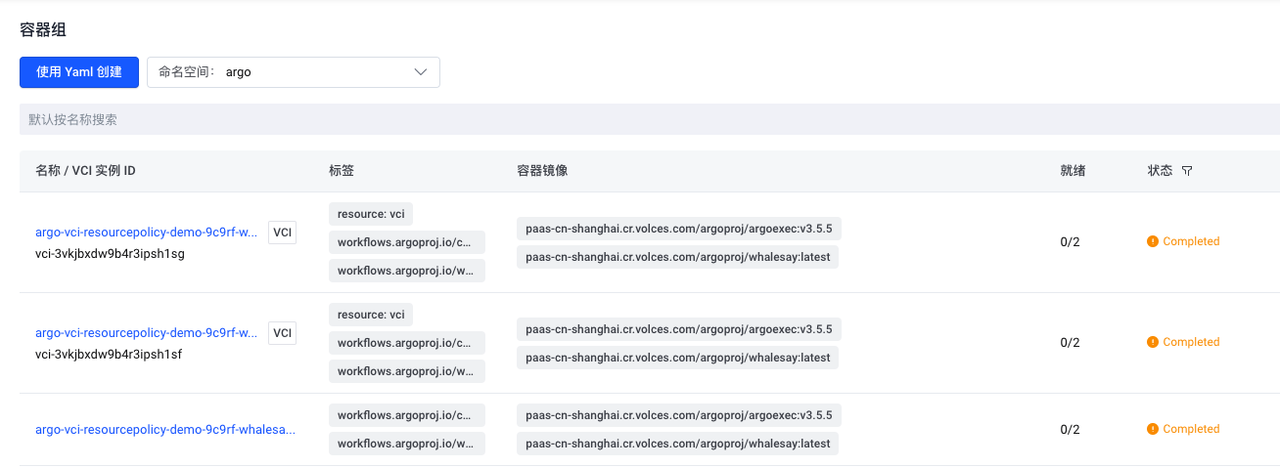
Method 3: Non-invasive implementation of task Pod scheduling to VCI through vci-profile of VKE container service
The two methods mentioned earlier require some modifications to the workflow configuration of Argo Workflow. In some cases, it is not feasible to modify the configuration of the workflow itself, for example, there are already a large number of existing workflows, and the modification workload is large. Or workflows belong to different teams, making it difficult to communicate and modify configurations across teams.
In this case, we can adjust the execution of the task pods of Argo Workflows non-invasively by using vci-profile.
Vci-profile is a VCI profile that provides the ability to use unified configuration and global fixed configuration for VCI resources in a clustered or namespace dimension. Reduce user modifications to YAML for business workloads, while enabling more convenient, efficient, and non-invasive use of VCI capabilities, avoiding user confusion between operation and maintenance management and business management. For specific usage, please refer to: https://www.volcengine.com/docs/6460/1209385 .
The following example allows pods created in the argo-jobs namespace to automatically run in elastic container mode by creating a namespace named argo-jobs, and then creating a vci-profile and associated scheduling matching rules, without the need to modify the configuration of the original workflows.
- Create the argo-jobs namespace, label the namespace: vci = true, and use it as a scheduling selector for rule matching in subsequent vci-profiles.
root@ecs-jumpbox:~/argo-workflow# kubectl create ns argo-jobs
namespace/demo-ns created
root@ecs-jumpbox:~/argo-workflow# kubectl label namespaces argo-jobs vci=true
namespace/demo-ns labeled
- Create the roles and service accounts required by Argo Workflows to run tasks in the argo-jobs namespace
root@ecs-jumpbox:~/argo-workflow# cat argo-role-sa.yaml
apiVersion: v1
kind: ServiceAccount
metadata:
  name: argo
  namespace: argo-jobs
---
apiVersion: rbac.authorization.k8s.io/v1
kind: Role
metadata:
  name: argo-role
  namespace: argo-jobs
rules:
- apiGroups:
  - coordination.k8s.io
  resources:
  - leases
  verbs:
  - create
  - get
  - update
- apiGroups:
  - ""
  resources:
  - secrets
  verbs:
  - get
- apiGroups:
  - ""
  resources:
  - pods
  verbs:
  - patch
- apiGroups:
  - argoproj.io
  resources:
  - workflowtaskresults
  verbs:
  - patch
  - create
---
apiVersion: rbac.authorization.k8s.io/v1
kind: RoleBinding
metadata:
  name: argo-binding
  namespace: argo-jobs
roleRef:
  apiGroup: rbac.authorization.k8s.io
  kind: Role
  name: argo-role
subjects:
- kind: ServiceAccount
  name: argo
  namespace: argo-jobs
- Create a vci-profile whose settings specify that pods created in the argo-jobs namespace are executed using elastic containers.
root@ecs-jumpbox:~/argo-workflow# cat vci-profile.yaml
apiVersion: v1
kind: ConfigMap
metadata:
Name: vci-profile #ConfigMap name, must be vci-profile.
Namespace: kube-system #The namespace to which the vci-profile file belongs must be kube-system.
data:
  preferredSubnetIds: subnet-5g1mi8e6aby873inqlbgzmar
tlsEnable: "true" #Whether the VCI Pod is enabled and logging to the Volcano Engine logging service.
securityContextPrivilegedConfig: ignore #VCI Pod's privileged mode compatibility configuration.
dnsPolicyClusterFirstWithHostNetConfig: clusterFirst #DNS resolution behavior configuration inside the VCI Pod.
volumesHostPathConfig: ignore #VCI Pod mount node file directory configuration.
hostIpConfig: podIp #VCI Pod's status.hostIP reverse field configuration.
enforceSelectorToVci: "true" #Whether to force dispatch selectors selected pods to VCI.
  selectors: |
    [
      {
        "name": "selector-argo-jobs-namespace",
        "namespaceSelector": {
          "matchLabels": {
            "vci": "true"
          }
        },
        "effect": {
          "annotations": {
            "vci.volcengine.com/tls-enable": "true"
          },
          "labels": {
            "created-by-vci": "true"
          }
        }
      }
    ]
root@ecs-jumpbox:~/argo-workflow# kubectl create -f vci-profile.yaml
configmap/vci-profile created
root@ecs-jumpbox:~/argo-workflow# kubectl get cm vci-profile -n kube-system -o yaml
apiVersion: v1
data:
  dnsPolicyClusterFirstWithHostNetConfig: clusterFirst
  enforceSelectorToVci: "true"
  hostIpConfig: podIp
  preferredSubnetIds: subnet-5g1mi8e6aby873inqlbgzmar
  securityContextPrivilegedConfig: ignore
  selectors: |
    [
      {
        "name": "selector-argo-jobs-namespace",
        "namespaceSelector": {
          "matchLabels": {
 "vci": "true"
          }
        },
        "effect": {
          "annotations": {
            "vci.volcengine.com/tls-enable": "true"
          },
          "labels": {
            "created-by-vci": "true"
          }
        }
      }
    ]
  tlsEnable: "true"
  volumesHostPathConfig: ignore
kind: ConfigMap
metadata:
  creationTimestamp: "2024-03-31T04:25:07Z"
  name: vci-profile
  namespace: kube-system
  resourceVersion: "1143669"
  uid: 471c7e00-61a4-4853-89e0-ee2389a7fe4d
- Running a standard workflow on Argo
apiVersion: argoproj.io/v1alpha1
kind: Workflow
metadata:
  generateName: argo-vci-vcipolicy-demo-
spec:
  entrypoint: hello-hello-hello
  templates:
  - name: hello-hello-hello
    steps:
    - - name: hello1
        template: whalesay
        arguments:
          parameters:
          - name: message
            value: "hello1"
    - - name: hello2a
        template: whalesay
        arguments:
          parameters:
          - name: message
            value: "hello2a"
      - name: hello2b
        template: whalesay
        arguments:
          parameters:
          - name: message
            value: "hello2b"
  - name: whalesay
    inputs:
      parameters:
      - name: message
    container:
      image: paas-cn-shanghai.cr.volces.com/argoproj/whalesay:latest
      command: [cowsay]
      args: ["{{inputs.parameters.message}}"]
argo submit -n argo-jobs argo-vci-vcipolicy-demo.yaml --serviceaccount argo
You can see the operation from the container service console.
Without modifying the original workflow configuration, the pods in the argo-jobs namespace can be run as elastic containers through the vci-profile method.
Operation monitoring of Argo Workflows
Argo Workflows supports monitoring metrics related to Prometheus exposed workflows
Reference document: https://argoproj.github.io/argo-workflows/metrics/
The main task service of Argo Workflows workflows-controller exposed metrics acquisition port:
name: workflow-controller
        ports:
 -  containerPort:   9090
 name:   metrics
          protocol: TCP
        - containerPort: 6060
          protocol: TCP
You can use Volcano Engine to host Prometheus service VMPs to monitor running Argo Workflows.
Reference configuration documentation: https://www.volcengine.com/docs/6731/176835
Configuration example:
apiVersion: monitoring.coreos.com/v1
kind: PodMonitor
metadata:
  labels:
    volcengine.vmp: "true"
  name: argo-workflow-controller-discover
  namespace: argo
spec:
  namespaceSelector:
    matchNames:
    - argo
  podMetricsEndpoints:
  - interval: 15s
    path: /metrics
    port: metrics
    relabelings:
    - action: replace
      replacement: argo-workflow-demo
      targetLabel: app
  selector:
    matchLabels:
      app: workflow-controller
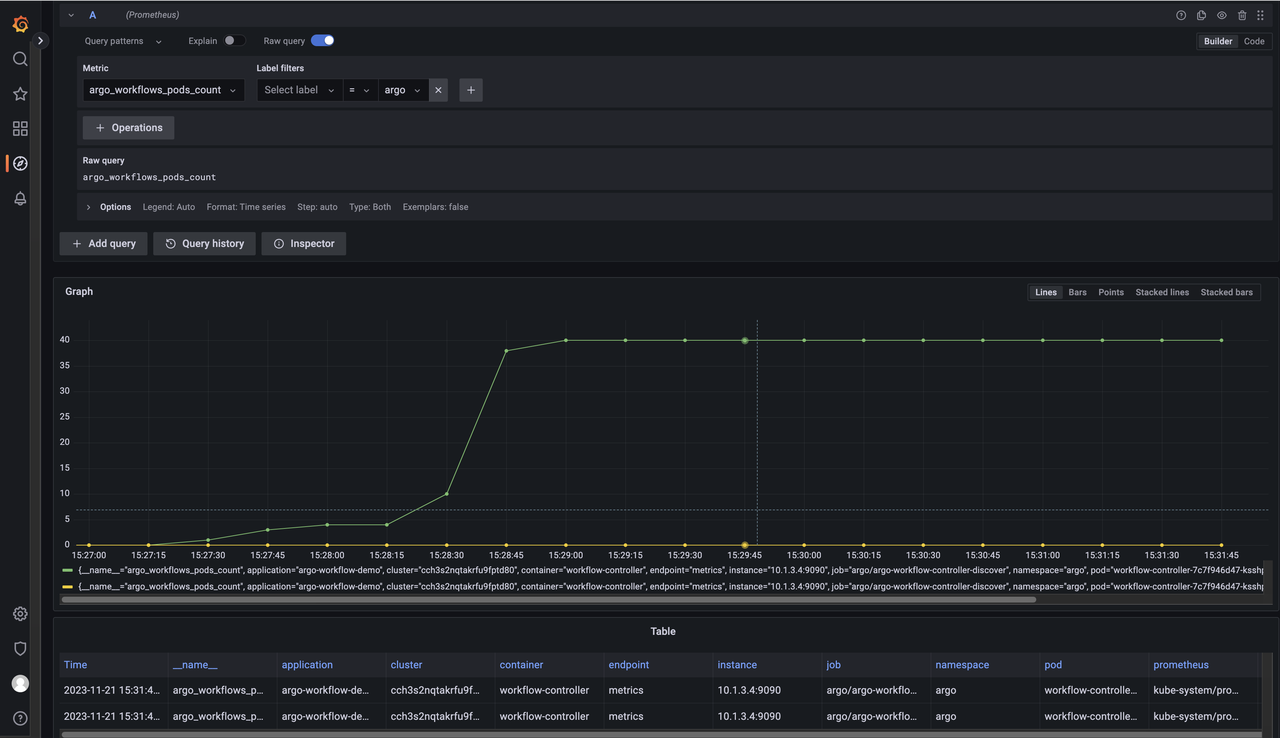
By configuring Grafana and using hosted Prometheus as the data source, you can query monitoring metrics related to Argo Workflows
For example: argo_workflows_pods_count
Example:
Animation rendering is an important part of the film and television/advertising design industry, and the rendering of a short video requires a lot of computing resources and rendering time.
You can use Argo Workflows to create a workflow for the rendering process of an animated video, split the animation rendering task into each frame of the rendering animation that can run in parallel, generate a still image of each frame, and then convert it into the final video file through the tool.
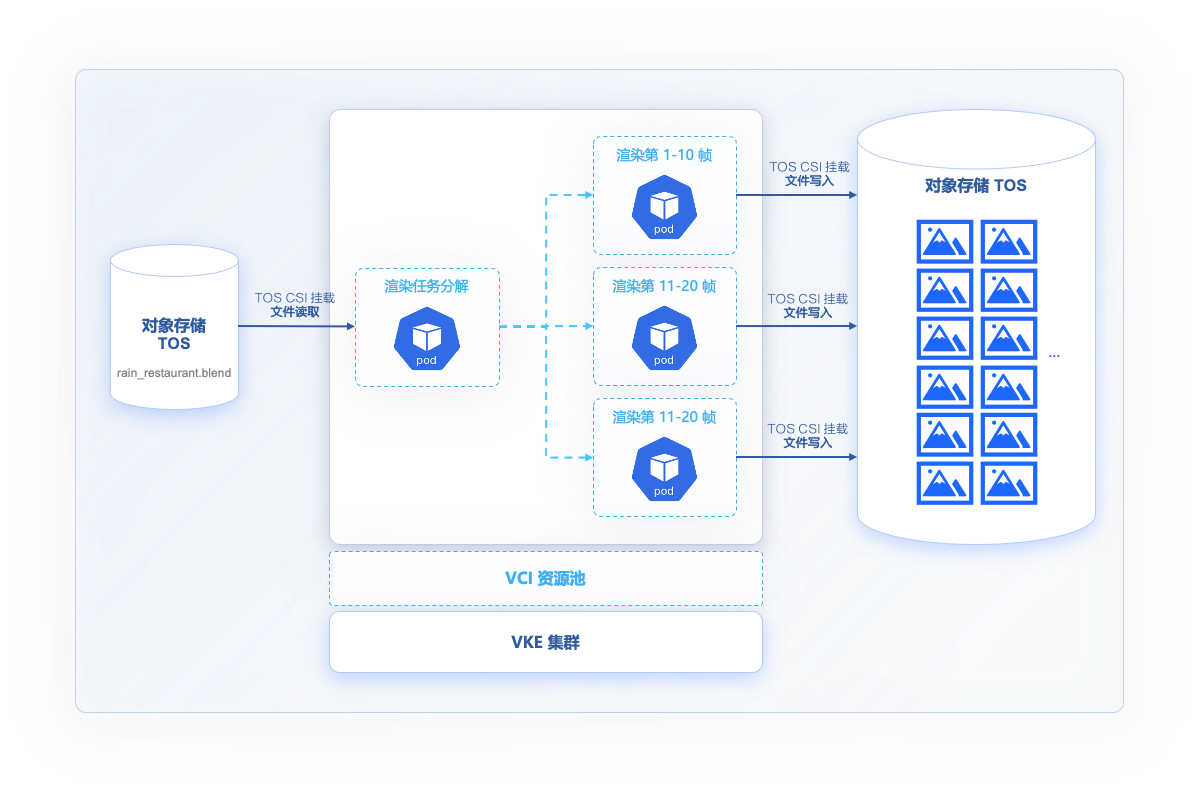
This example uses open source animation and rendering tools: https://www.blender.org/
Rendering animation file: https://studio.blender.org/characters/5f1ed640e9115ed35ea4b3fb/showcase/1/
Animation files exist in Volcano Engine's Object Storage (TOS): https://xmo-sh-tos.tos-cn-shanghai.volces.com/restaurant_anim_test/rain_restaurant.blend
Object storage is mounted to the run directory via VCI-supported TOS CSI /data
The configuration file is as follows:
root@ecs-jumpbox:~# kubectl get pv  shared-data-pv -n argo-jobs
NAME             CAPACITY   ACCESS MODES   RECLAIM POLICY   STATUS   CLAIM                       STORAGECLASS   REASON   AGE
shared-data-pv   20Gi       RWX            Retain           Bound    argo-jobs/shared-data-pvc                           3d20h
root@ecs-jumpbox:~# kubectl get pvc -n argo-jobs
NAME              STATUS   VOLUME           CAPACITY   ACCESS MODES   STORAGECLASS   AGE
shared-data-pvc   Bound    shared-data-pv   20Gi       RWX                           3d20h
root@ecs-jumpbox:~# cat blender_cpu_render.vci.rain_restaurant.yaml
apiVersion: argoproj.io/v1alpha1
kind: Workflow
metadata:
  generateName: render-
spec:
  entrypoint: main
  parallelism: 100
  activeDeadlineSeconds: 864000
  arguments:
    parameters:
    - name: filename
      value: '/data/restaurant_anim_test/rain_restaurant.blend'
    - name: sliceSize
Value: 10 #Render 10 frames per render task
    - name: start
Value: 1 #Render from the first frame of the animation file
    - name: stop
Value: 300 #Render to frame 300
    - name: outputLocation
      value: "/data/output/rain_restaurant_300/"
    - name: samples
      value: 300


  volumes:
  - name: data-storage
    persistentVolumeClaim:
      claimName: shared-data-pvc

  templates: # This defines the steps in our workflow.
  - name: main
    steps:
    - - name: slice
        template: gen-slices
    - - name: render
        template: render-blender
        arguments:
          parameters:
          - name: start
            value: "{{item.start}}"
          - name: stop
            value: "{{item.stop}}"
        withParam: "{{steps.slice.outputs.result}}"

  - name: gen-slices
    script:
      image: cr-demo-cn-beijing.cr.volces.com/xmo/python:3.8-slim-buster
      command: [python]
      source: |
        import json
        import sys
        frames = range({{workflow.parameters.start}}, {{workflow.parameters.stop}}+1)
        n = {{workflow.parameters.sliceSize}}
        slices = [frames[i * n:(i + 1) * n] for i in range((len(frames) + n - 1) // n )]
        intervals = map(lambda x: {'start': min(x), 'stop': max(x)}, slices)
        json.dump(list(intervals), sys.stdout)
  - name: render-blender
    metadata:
      annotations:
vke.volcengine.com/burst-to-vci: enforce #Specify rendering task Pod scheduling to VCI
    inputs:
      parameters:
      - name: start
      - name: stop
      artifacts:
      - name: blender_samples
        path: /blender_samples.py
        raw:
          data: |

            import bpy
            bpy.data.scenes["Scene"].cycles.samples = {{workflow.parameters.samples}}

    retryStrategy:
      limit: 1
    container:
      image: paas-cn-shanghai.cr.volces.com/argoproj/blender:3.3.1-cpu-ubuntu18.04
      command: ["blender"]
      workingDir: /
      args: [
            "-b",
            "{{workflow.parameters.filename}}",
            "--engine", "CYCLES",
            "--factory-startup", "-noaudio",
            "--use-extension", "1",
            "-o", "{{workflow.parameters.outputLocation}}",
            "--python", "blender_samples.py",
            "-s", "{{inputs.parameters.start}}",
            "-e", "{{inputs.parameters.stop}}",
            "-a"
      ]
      resources:
        requests:
          memory: 8Gi
          cpu: 1
        limits:
          cpu: 2
          memory: 16Gi
      volumeMounts:
      - name: data-storage
        mountPath: /data
Show 10 parallel rendering tasks running from the Argo Workflows console. This is 10 times faster than conventional single-task rendering.
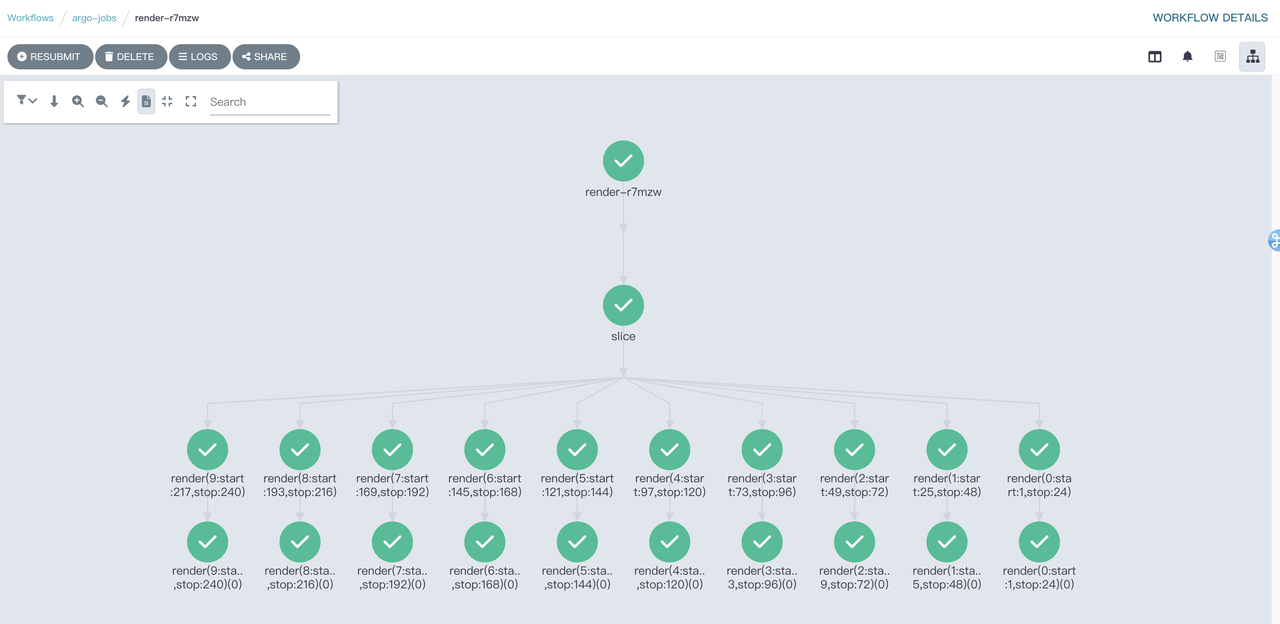
After rendering, all pods created by task runs are released, and billing for VCI ends. Users only need to be billed according to the actual running time of the pod and the CPU/memory usage.
