
Python Pandas:为含MultiIndex的样式化DataFrame设置交替背景色并保留总计行自定义格式

2026-4-14
Python Pandas:为含MultiIndex的样式化DataFrame设置交替背景色并保留总计行自定义格式
针对你的需求,我整理了一个可行的解决方案——既能给带MultiIndex的DataFrame添加交替行背景色,又能保留总计行的特殊格式,同时还支持导出到Excel(避开了set_table_styles()的局限性)。先回顾下你的场景:
初始设置
你已经有了这样的DataFrame和基础样式:
import pandas as pd
import numpy as np

arrays = [
    np.array(["fruit", "fruit", "fruit","vegetable", "vegetable", "vegetable"]),
    np.array(["one", "two", "total", "one", "two", "total"]),
]

df = pd.DataFrame(np.random.randn(6, 4), index=arrays)

df.index.set_names(['item','count'],inplace=True)

def style_total(s):
  m = s.index.get_level_values('count') == 'total'
  return np.where(m, 'font-weight: bold; background-color: #D2D2D2', None)

def style_total_index(s):
  return np.where(s == 'total', 'font-weight: bold; background-color: #D2D2D2','')

(df
 .style
 .apply_index(style_total_index)
 .apply(style_total)
 )
当前的样式效果: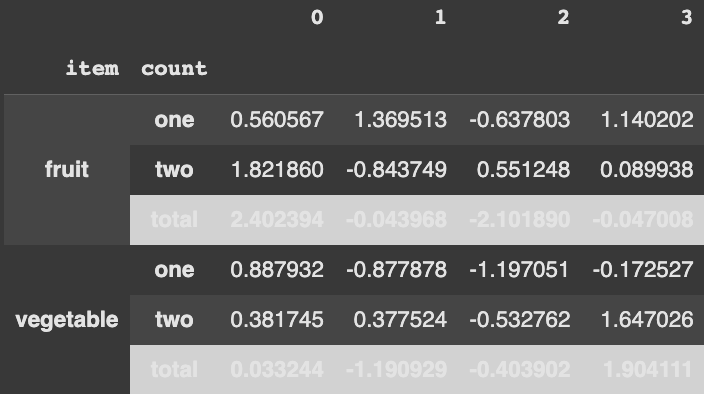
你的需求
希望给所有行(包括MultiIndex部分)添加交替背景色,同时保留total行的加粗+灰色背景的自定义格式,期望效果如下: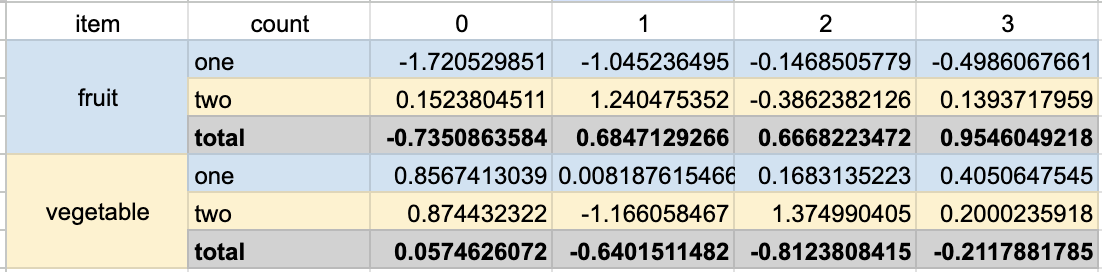
解决方案思路
因为set_table_styles()无法导出到Excel,所以我们改用apply和apply_index来实现核心逻辑:
- 先给非总计行设置交替背景色
- 再用总计行的样式覆盖对应的行,保证总计行的格式优先级更高
完整实现代码
import pandas as pd
import numpy as np

# 构建原始DataFrame
arrays = [
    np.array(["fruit", "fruit", "fruit","vegetable", "vegetable", "vegetable"]),
    np.array(["one", "two", "total", "one", "two", "total"]),
]

df = pd.DataFrame(np.random.randn(6, 4), index=arrays)
df.index.set_names(['item','count'],inplace=True)

# 1. 定义交替行样式(数据行)
def style_alternating_rows(s):
    # 标记非总计行
    non_total = s.index.get_level_values('count') != 'total'
    # 生成交替行掩码
    alt_rows = np.arange(len(s)) % 2 == 0

    # 给不同情况分配样式:偶数非总计行浅灰,奇数非总计行白色,总计行留空
    return np.where(
        non_total & alt_rows,
        'background-color: #F5F5F5',
        np.where(
            non_total & ~alt_rows,
            'background-color: #FFFFFF',
            None
        )
    )

# 2. 定义交替索引样式(MultiIndex行)
def style_alternating_index(s):
    # 获取所有行的count索引值
    count_vals = df.index.get_level_values('count')
    styles = []
    for idx, val in enumerate(s):
        if count_vals[idx] == 'total':
            # 总计索引留空,后续用总计样式覆盖
            styles.append('')
        else:
            # 交替设置背景色
            styles.append('background-color: #F5F5F5' if idx % 2 == 0 else 'background-color: #FFFFFF')
    return styles

# 3. 保留你原有的总计样式函数
def style_total(s):
    m = s.index.get_level_values('count') == 'total'
    return np.where(m, 'font-weight: bold; background-color: #D2D2D2', None)

def style_total_index(s):
    return np.where(s == 'total', 'font-weight: bold; background-color: #D2D2D2','')

# 4. 按顺序应用样式:先交替色,再总计样式(保证总计样式优先级更高)
styled_df = (df
 .style
 .apply_index(style_alternating_index, axis=0)  # 先给索引加交替色
 .apply_index(style_total_index)                # 覆盖总计索引的样式
 .apply(style_alternating_rows)                 # 先给数据行加交替色
 .apply(style_total)                            # 覆盖总计行的样式
 )

styled_df
关键说明
- 样式优先级:先应用交替色样式,再应用总计样式,这样总计行的格式会覆盖交替色,确保特殊格式不被破坏。
- Excel兼容性:所有样式都是通过
apply/apply_index设置的,会被正确导出到Excel,避开了set_table_styles()的问题。 - 灵活性:你可以根据需要修改交替色的HEX值,调整成自己喜欢的配色。
备注:内容来源于stack exchange,提问作者bismo
相关产品推荐
相关产品推荐


