
求助:使用OpenCV检测视频中形状时出现漏检与大量误检问题

2026-4-15
求助:使用OpenCV检测视频中形状时出现漏检与大量误检问题
我现在尝试用OpenCV结合Python从视频源中检测各种形状,但我的代码只能检测出“幽灵圆圈”,我不知道为什么会出现这种情况。
以下是我的完整带注释代码:
import cv2

# Initialize counters for detected shapes
triangle_count = 0
quadrilateral_count = 0
pentagon_count = 0
hexagon_count = 0
circle_count = 0

# Horizontal reference line (middle of the frame)
line_y = 240  # Adjust according to the height of the video

# Read the video from file
video_path = 'video.mp4'  # Video path
cap = cv2.VideoCapture(video_path)

# Check if the video is loaded correctly
if not cap.isOpened():
    print("Error opening video.")
    exit()

# Process the video frame by frame
while cap.isOpened():
    ret, frame = cap.read()
    if not ret:
        break  # Exit when the video ends

    # Create a copy of the original frame to use later
    original = frame.copy()

    # Convert the frame from BGR to HSV
    hsv_image = cv2.cvtColor(frame, cv2.COLOR_BGR2HSV)

    # Convert the HSV image to grayscale
    gray_image = cv2.cvtColor(hsv_image, cv2.COLOR_BGR2GRAY)

    # Apply Otsu thresholding to binarize the image
    ret, otsu = cv2.threshold(gray_image, 0, 255, cv2.THRESH_BINARY + cv2.THRESH_OTSU)

    # Apply the mask to the original image
    image = cv2.bitwise_and(original, original, mask=otsu)

    # Find contours in the binary image
    contours, _ = cv2.findContours(otsu, cv2.RETR_TREE, cv2.CHAIN_APPROX_SIMPLE)

    # Draw the horizontal reference line
    cv2.line(frame, (0, line_y), (frame.shape[1], line_y), (0, 255, 0), 2)

    # Process each contour
    for i, contour in enumerate(contours):
        if i == 0:  # Ignore the largest outer contour
            continue

        # Calculate the area of the contour
        contour_area = cv2.contourArea(contour)

        # Filter out small objects based on area
        if contour_area < 300:  # Adjust the minimum area value
            continue

        # Approximate the shape of the contour
        epsilon = 0.01 * cv2.arcLength(contour, True)
        approx = cv2.approxPolyDP(contour, epsilon, True)

        # Calculate the center of the object (bounding box coordinates)
        x, y, w, h = cv2.boundingRect(approx)
        center_y = y + h // 2  # Y coordinate of the object's center

        # Check if the object crosses the horizontal reference line
        if line_y - 10 <= center_y <= line_y + 10:
            # Classify the shape based on the number of vertices
            if len(approx) == 3:
                cv2.putText(frame, "Triangle", (x, y - 10), cv2.FONT_HERSHEY_SIMPLEX, 0.6, (0, 0, 255), 2)
                triangle_count += 1
            elif len(approx) == 4:
                cv2.putText(frame, "Quadrilateral", (x, y - 10), cv2.FONT_HERSHEY_SIMPLEX, 0.6, (255, 0, 0), 2)
                quadrilateral_count += 1
            elif len(approx) == 5:
                cv2.putText(frame, "Pentagon", (x, y - 10), cv2.FONT_HERSHEY_SIMPLEX, 0.6, (0, 255, 0), 2)
                pentagon_count += 1
            elif len(approx) == 6:
                cv2.putText(frame, "Hexagon", (x, y - 10), cv2.FONT_HERSHEY_SIMPLEX, 0.6, (0, 255, 255), 2)
                hexagon_count += 1
            else:
                cv2.putText(frame, "Circle", (x, y - 10), cv2.FONT_HERSHEY_SIMPLEX, 0.6, (255, 255, 0), 2)
                circle_count += 1

            # Draw the detected contour
            cv2.drawContours(frame, [approx], 0, (0, 0, 0), 2)

    # Display the counters in the top left corner
    cv2.putText(frame, f"Triangles: {triangle_count}", (10, 20), cv2.FONT_HERSHEY_SIMPLEX, 0.6, (0, 0, 255), 2)
    cv2.putText(frame, f"Quadrilaterals: {quadrilateral_count}", (10, 40), cv2.FONT_HERSHEY_SIMPLEX, 0.6, (255, 0, 0), 2)
    cv2.putText(frame, f"Pentagons: {pentagon_count}", (10, 60), cv2.FONT_HERSHEY_SIMPLEX, 0.6, (0, 255, 0), 2)
    cv2.putText(frame, f"Hexagons: {hexagon_count}", (10, 80), cv2.FONT_HERSHEY_SIMPLEX, 0.6, (0, 255, 255), 2)
    cv2.putText(frame, f"Circles: {circle_count}", (10, 100), cv2.FONT_HERSHEY_SIMPLEX, 0.6, (255, 255, 0), 2)

    # Show the processed frame
    cv2.imshow("Shape Detection", frame)

    # Exit with the 'q' key
    if cv2.waitKey(1) & 0xFF == ord('q'):
        break

# Release resources
cap.release()
cv2.destroyAllWindows()
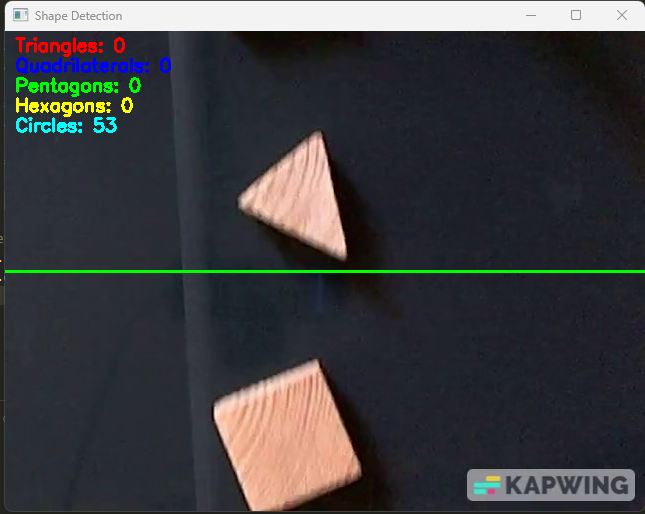
如我们所见,当形状穿过水平线时应该被分类。如果你们能帮我解决这个问题,我会非常感激,测试只需安装OpenCV和Python环境即可运行代码。
UPDATE - 第二种方法
我发现这些形状的轮廓面积应该大于5000:
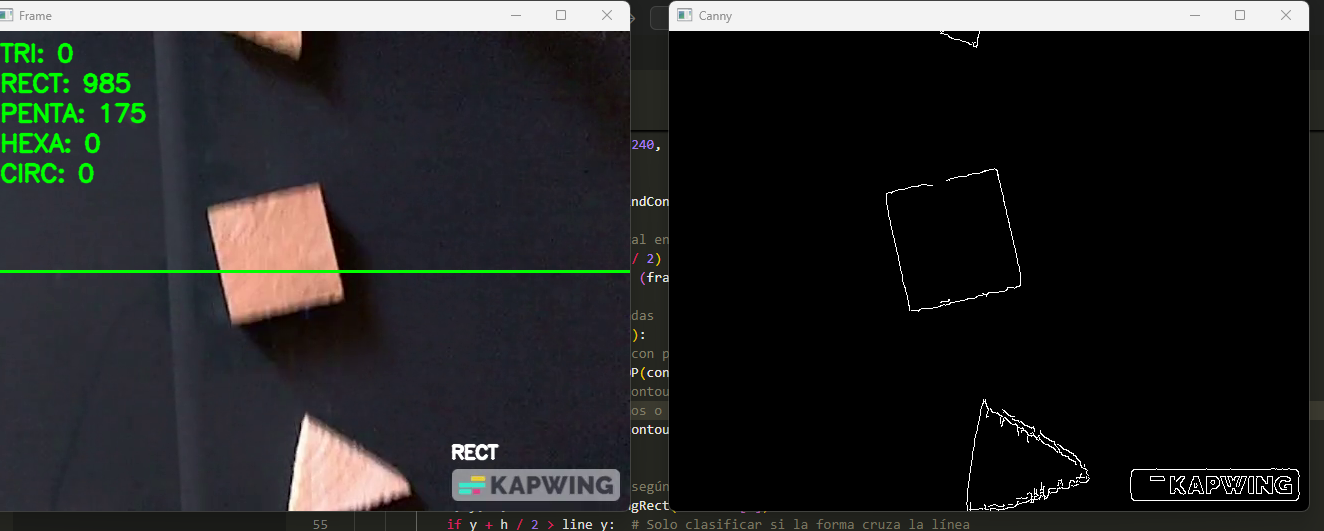
对应的代码如下:
import math
import numpy as np
import cv2

# Initialize the camera or video
cap = cv2.VideoCapture("video.mp4")
print("Press 'q' to exit")

# Function to calculate the angle between three points
def angle(pt1, pt2, pt0):
    dx1 = pt1[0][0] - pt0[0][0]
    dy1 = pt1[0][1] - pt0[0][1]
    dx2 = pt2[0][0] - pt0[0][0]
    dy2 = pt2[0][1] - pt0[0][1]
    return float((dx1 * dx2 + dy1 * dy2)) / math.sqrt(float((dx1 * dx1 + dy1 * dy1)) * (dx2 * dx2 + dy2 * dy2) + 1e-10)

# Initialize a dictionary to count the detected shapes
shape_counts = {
    'TRI': 0,
    'RECT': 0,
    'PENTA': 0,
    'HEXA': 0,
    'CIRC': 0
}

# Main loop
while(cap.isOpened()):
    # Capture frame by frame
    ret, frame = cap.read()
    if ret:
        # Convert to grayscale
        gray = cv2.cvtColor(frame, cv2.COLOR_BGR2GRAY)

        # Apply the Canny detector
        canny = cv2.Canny(gray, 80, 240, 3)

        # Find contours
        contours, hierarchy = cv2.findContours(canny, cv2.RETR_EXTERNAL, cv2.CHAIN_APPROX_SIMPLE)

        # Draw a horizontal line in the center of the image
        line_y = int(frame.shape[0] / 2)
        cv2.line(frame, (0, line_y), (frame.shape[1], line_y), (0, 255, 0), 2)

        # Shape detection counter
        for i in range(len(contours)):
            # Approximate the contour with precision proportional to the perimeter of the contour
            approx = cv2.approxPolyDP(contours[i], cv2.arcLength(contours[i], True) * 0.02, True)
            # Filter small or non-convex objects
            if abs(cv2.contourArea(contours[i])) < 5000 or not cv2.isContourConvex(approx):
                continue

            # Classify the shapes based on the number of vertices
            x, y, w, h = cv2.boundingRect(contours[i])
            if y + h / 2 > line_y:  # Only classify if the shape crosses the line
                if len(approx) == 3:
                    # Triangle
                    shape_counts['TRI'] += 1
                    cv2.putText(frame, 'TRI', (x, y - 10), cv2.FONT_HERSHEY_SIMPLEX, 0.6, (255, 255, 255), 2, cv2.LINE_AA)
                elif 4 <= len(approx) <= 6:
                    # Polygon classification
                    vtc = len(approx)
                    cos = []

                    # Calculate the angles between the vertices using the angle() function
                    for j in range(2, vtc + 1):
                        cos.append(angle(approx[j % vtc], approx[j - 2], approx[j - 1]))

                    # Sort the angles and determine the type of figure
                    cos.sort()
                    mincos = cos[0]
                    maxcos = cos[-1]

                    # Classify based on the number of vertices
                    if vtc == 4:
                        shape_counts['RECT'] += 1
                        cv2.putText(frame, 'RECT', (x, y - 10), cv2.FONT_HERSHEY_SIMPLEX, 0.6, (255, 255, 255), 2, cv2.LINE_AA)
                    elif vtc == 5:
                        shape_counts['PENTA'] += 1
                        cv2.putText(frame, 'PENTA', (x, y - 10), cv2.FONT_HERSHEY_SIMPLEX, 0.6, (255, 255, 255), 2, cv2.LINE_AA)
                    elif vtc == 6:
                        shape_counts['HEXA'] += 1
                        cv2.putText(frame, 'HEXA', (x, y - 10), cv2.FONT_HERSHEY_SIMPLEX, 0.6, (255, 255, 255), 2, cv2.LINE_AA)
                else:
                    # Detect and label circle
                    area = cv2.contourArea(contours[i])
                    radius = w / 2
                    if abs(1 - (float(w) / h)) <= 2 and abs(1 - (area / (math.pi * radius * radius))) <= 0.2:
                        shape_counts['CIRC'] += 1
                        cv2.putText(frame, 'CIRC', (x, y - 10), cv2.FONT_HERSHEY_SIMPLEX, 0.6, (255, 255, 255), 2, cv2.LINE_AA)

        # Display the number of each detected shape at the top of the image
        offset_y = 30
        for shape, count in shape_counts.items():
            cv2.putText(frame, f'{shape}: {count}', (10, offset_y), cv2.FONT_HERSHEY_SIMPLEX, 0.8, (0, 255, 0), 2, cv2.LINE_AA)
            offset_y += 30

        # Display the resulting frame
        cv2.imshow('Frame', frame)
        cv2.imshow('Canny', canny)

        # Exit if 'q' is pressed
        if cv2.waitKey(1) == ord('q'):
            break

# Once finished, release the capture
cap.release()
cv2.destroyAllWindows()
但现在还是检测到大量矩形和五边形,可我的视频里其实只有三角形和圆形。
备注:内容来源于stack exchange,提问作者FreddicMatters
相关产品推荐
相关产品推荐


