
React Native中如何实现多级吸顶表头?优先使用FlatList或VirtualizedList

2026-9-27
React Native 多级吸顶表头实现方案(基于FlatList/VirtualizedList)
效果示例
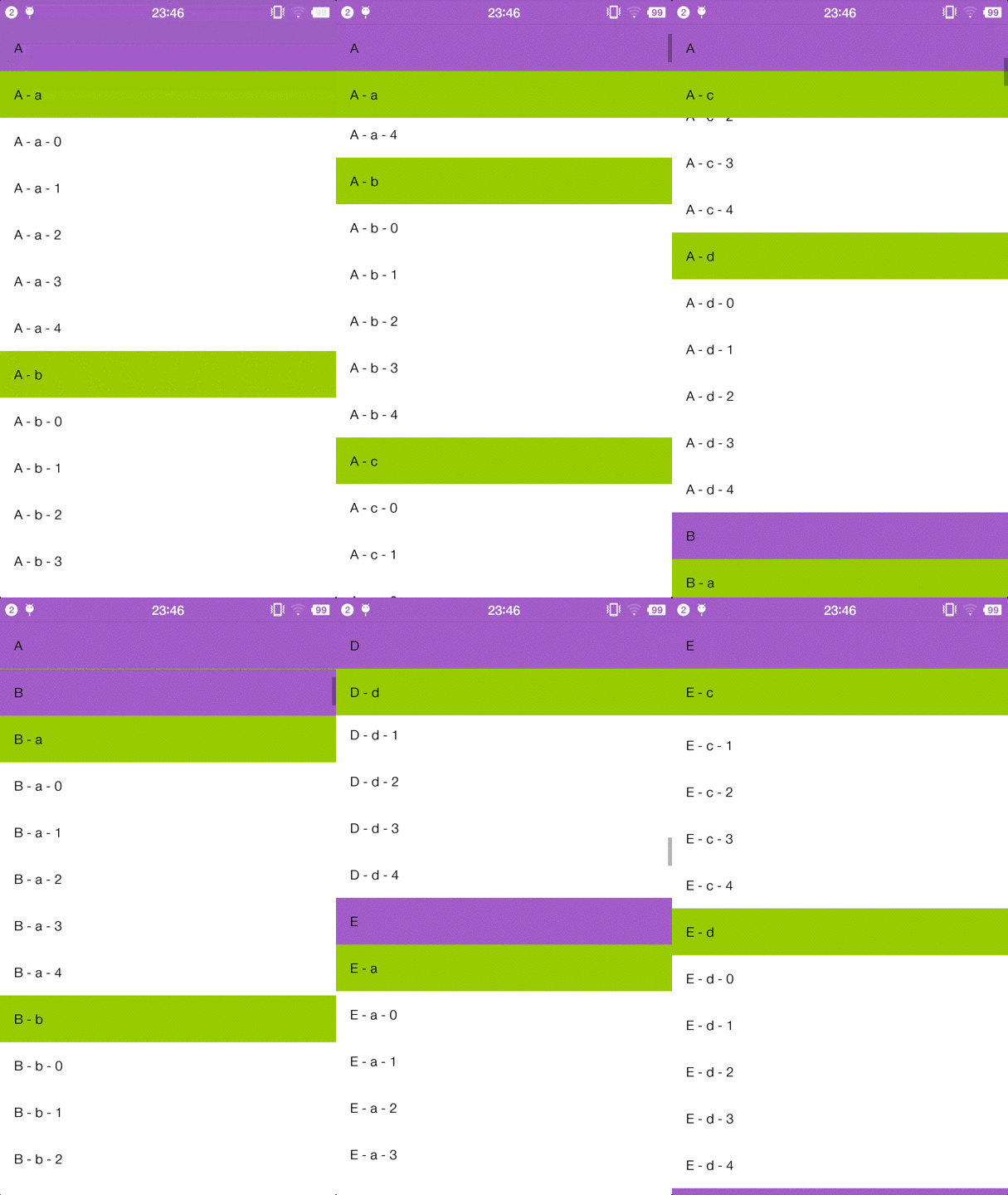
实现思路
FlatList官方提供的stickyHeaderIndices属性原生支持将指定下标的列表项固定在列表顶部,利用这个特性搭配不同层级的zIndex设置,即可快速实现多级吸顶效果,无需引入第三方组件。
实现步骤
- 结构化数据源:将原始的嵌套格式数据平铺为一维列表,给每一项添加type标记,区分一级表头、二级表头、普通列表项三种类型。
- 收集吸顶下标:遍历平铺后的列表,将所有一级、二级表头对应的下标存入数组,后续传入FlatList的
stickyHeaderIndices属性。 - 区分渲染样式:自定义
renderItem方法,根据不同项的type渲染对应样式,给层级更高的表头设置更高的zIndex,保证吸顶时上层表头覆盖下层。
最简可运行代码示例
import React, { useMemo } from 'react';
import { FlatList, View, Text, StyleSheet } from 'react-native';

const MultiStickyHeaderDemo = () => {
  // 模拟原始嵌套数据
  const originData = [
    {
      firstLevelName: '水果',
      secondGroups: [
        {
          secondLevelName: '热带水果',
          items: ['榴莲', '芒果', '山竹', '菠萝蜜', '莲雾']
        },
        {
          secondLevelName: '温带水果',
          items: ['苹果', '梨', '桃子', '葡萄', '猕猴桃']
        }
      ]
    },
    {
      firstLevelName: '蔬菜',
      secondGroups: [
        {
          secondLevelName: '叶菜类',
          items: ['白菜', '生菜', '油麦菜', '菠菜', '芹菜']
        },
        {
          secondLevelName: '根茎类',
          items: ['萝卜', '土豆', '山药', '莲藕', '红薯']
        }
      ]
    }
  ];

  // 预处理数据:平铺列表 + 收集吸顶项下标
  const { listData, stickyIndices } = useMemo(() => {
    const finalList = [];
    const stickyArr = [];
    originData.forEach(firstGroup => {
      // 插入一级表头,记录下标
      stickyArr.push(finalList.length);
      finalList.push({
        type: 'first_header',
        title: firstGroup.firstLevelName
      });
      firstGroup.secondGroups.forEach(secondGroup => {
        // 插入二级表头,记录下标
        stickyArr.push(finalList.length);
        finalList.push({
          type: 'second_header',
          title: secondGroup.secondLevelName
        });
        // 插入普通列表项
        secondGroup.items.forEach(itemName => {
          finalList.push({
            type: 'normal_item',
            content: itemName
          });
        })
      })
    });
    return { listData: finalList, stickyIndices: stickyArr };
  }, []);

  // 渲染不同类型的列表项
  const renderListItem = ({ item }) => {
    switch (item.type) {
      case 'first_header':
        return (
          <View style={styles.firstHeaderBox}>
            <Text style={styles.firstHeaderText}>{item.title}</Text>
          </View>
        );
      case 'second_header':
        return (
          <View style={styles.secondHeaderBox}>
            <Text style={styles.secondHeaderText}>{item.title}</Text>
          </View>
        );
      case 'normal_item':
        return (
          <View style={styles.normalItemBox}>
            <Text style={styles.normalItemText}>{item.content}</Text>
          </View>
        );
      default:
        return null;
    }
  };

  return (
    <FlatList
      data={listData}
      renderItem={renderListItem}
      stickyHeaderIndices={stickyIndices}
      keyExtractor={(_, index) => `list_item_${index}`}
      showsVerticalScrollIndicator={false}
    />
  );
};

const styles = StyleSheet.create({
  firstHeaderBox: {
    height: 52,
    paddingHorizontal: 16,
    backgroundColor: '#f0f0f0',
    justifyContent: 'center',
    zIndex: 10 // 一级表头层级最高
  },
  firstHeaderText: {
    fontSize: 18,
    fontWeight: 'bold',
    color: '#333'
  },
  secondHeaderBox: {
    height: 44,
    paddingHorizontal: 24,
    backgroundColor: '#f8f8f8',
    justifyContent: 'center',
    zIndex: 5 // 二级表头层级低于一级
  },
  secondHeaderText: {
    fontSize: 16,
    fontWeight: '500',
    color: '#444'
  },
  normalItemBox: {
    height: 40,
    paddingHorizontal: 32,
    justifyContent: 'center',
    borderBottomWidth: StyleSheet.hairlineWidth,
    borderBottomColor: '#eee'
  },
  normalItemText: {
    fontSize: 14,
    color: '#666'
  }
});

export default MultiStickyHeaderDemo;
注意事项
- 所有吸顶的表头组件必须设置不透明的背景色,否则滚动时会出现下层内容透上来的重叠问题
- 层级越高的表头zIndex值越大,保证一级表头吸顶时始终覆盖在二级表头之上
- 如果列表数据量极大,可直接替换为
VirtualizedList,实现逻辑完全一致,仅需要额外配置getItem和getItemCount两个属性即可,性能更优 - 本方案依赖React Native官方原生能力,无需引入任何第三方依赖,兼容性覆盖所有支持FlatList的RN版本
内容的提问来源于stack exchange,提问作者Yairopro
相关产品推荐
相关产品推荐


