
WooCommerce模态框结账时Stripe信用卡支付表单失效问题

2026-8-27
问题描述
我需要在模态框而非独立结账页面中使用Stripe结账功能,但当[woocommerce_checkout]短代码加载到模态框内时,Stripe结账表单会处于禁用状态,该短代码在普通页面的结账场景下可完全正常运行。
现有实现代码
PHP 后端AJAX接口代码
add_action( 'wp_ajax_getCheckoutPageContent', 'getCheckoutPageContentCallBack' );
add_action( 'wp_ajax_nopriv_getCheckoutPageContent', 'getCheckoutPageContentCallBack' );

function getCheckoutPageContentCallBack() {
    $product_id        = absint( $_POST['product_id'] );
    $quantity          = absint( $_POST['quantity'] );
    $product_status    = get_post_status( $product_id );
    $passed_validation = apply_filters( 'woocommerce_add_to_cart_validation', true, $product_id, $quantity );

    if ( WC()->cart->add_to_cart( $product_id, $quantity ) ) {
        do_action( 'woocommerce_ajax_added_to_cart', $product_id );
        global $woocommerce;
        $items = $woocommerce->cart->get_cart();

        wc_setcookie( 'woocommerce_items_in_cart', count( $items ) );
        wc_setcookie( 'woocommerce_cart_hash', md5( json_encode( $items ) ) );
        do_action( 'woocommerce_set_cart_cookies', true );

        define( 'WOOCOMMERCE_CHECKOUT', true );
        echo do_shortcode('[woocommerce_checkout]');

    }else{
        define( 'WOOCOMMERCE_CHECKOUT', true );
        echo do_shortcode('[woocommerce_checkout]');
    }
    die();
}
前端模态框实现代码
<!-- Start Booking Popup Modal Area --> <div class="booking-popup-modal-area modal right fade" id="Booking-Popup-Modal" tabindex="-1" role="dialog" aria-labelledby="Booking-Popup-Modal" aria-hidden="true"> <div class="modal-dialog" role="document"> <div class="modal-content"> <button type="button" class="btn-close" data-dismiss="modal" aria-label="Close"><span aria-hidden="true">×</span></button> <div class="modal-body"> <div id="checkOutPageContent"> </div> </div> </div> </div> </div> <script type="text/javascript"> function customCheckout(event){ var wp_ajax_url="<?php echo site_url();?>/wp-admin/admin-ajax.php"; var data = { action: 'getCheckoutPageContent', product_id: jQuery(event.target).data('productid'), quantity: 1 }; jQuery.post( wp_ajax_url, data, function(content) { jQuery("#checkOutPageContent").html(content); jQuery("#Booking-Popup-Modal").modal('show'); }); } </script> <!-- End Booking Popup Modal Area -->
问题表现
问题截图如下: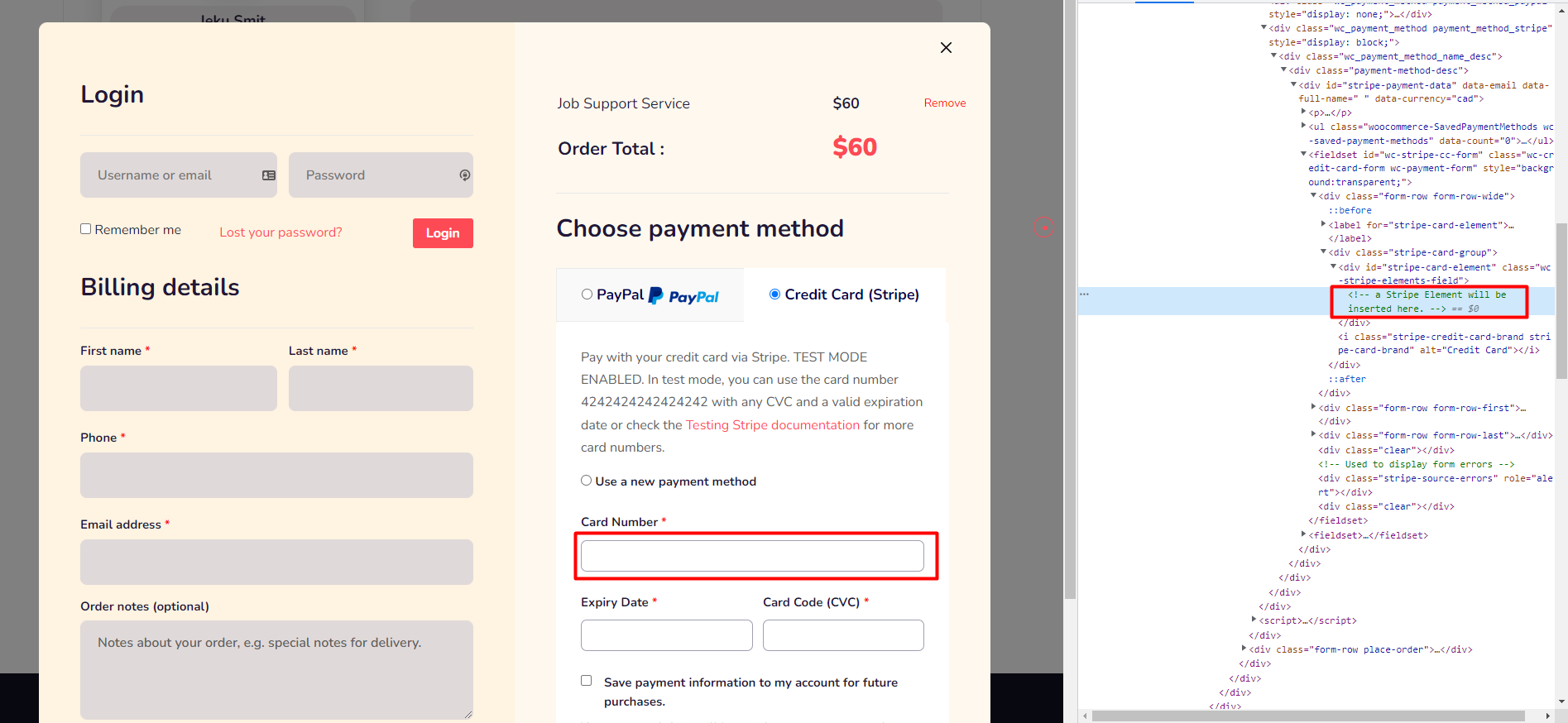
目前无法定位问题成因,也未找到适配的公开解决方案,需要明确当前实现存在的疏漏以及对应的修复方法。
问题原因与修复方案
核心原因:
Stripe支付表单的初始化逻辑默认在页面首次DOM加载完成时执行,通过AJAX异步将结账短代码插入模态框时,初始DOM加载流程早已结束,Stripe相关JS没有触发初始化;同时WooCommerce结账依赖的前端脚本、样式没有在AJAX请求时完成入队和事件绑定,直接导致表单处于禁用状态。另外原有代码存在重复定义PHP常量的隐患,当加购逻辑触发分支判断时会抛出致命错误。
修复步骤:
- 调整PHP回调逻辑,避免重复定义常量,在返回结账HTML时同步输出依赖的脚本、样式,确保前端资源加载完整
- 在前端AJAX插入内容、模态框完全显示后,手动触发WooCommerce结账更新事件和Stripe支付元素的重新初始化
- 若站点启用了缓存或会话验证,需要在AJAX请求时携带WooCommerce会话cookie参数,避免购物车数据不匹配
修改后的PHP代码
add_action( 'wp_ajax_getCheckoutPageContent', 'getCheckoutPageContentCallBack' );
add_action( 'wp_ajax_nopriv_getCheckoutPageContent', 'getCheckoutPageContentCallBack' );

function getCheckoutPageContentCallBack() {
    // 提前判断常量是否存在,避免重复定义报错
    if ( ! defined( 'WOOCOMMERCE_CHECKOUT' ) ) {
        define( 'WOOCOMMERCE_CHECKOUT', true );
    }

    $product_id        = absint( $_POST['product_id'] );
    $quantity          = absint( $_POST['quantity'] );
    $passed_validation = apply_filters( 'woocommerce_add_to_cart_validation', true, $product_id, $quantity );

    // 合并原有重复分支逻辑
    if ( $passed_validation && WC()->cart->add_to_cart( $product_id, $quantity ) ) {
        do_action( 'woocommerce_ajax_added_to_cart', $product_id );
        global $woocommerce;
        $items = $woocommerce->cart->get_cart();

        wc_setcookie( 'woocommerce_items_in_cart', count( $items ) );
        wc_setcookie( 'woocommerce_cart_hash', md5( json_encode( $items ) ) );
        do_action( 'woocommerce_set_cart_cookies', true );
    }

    // 强制加载结账所需的全部脚本、样式
    WC()->frontend_includes();
    echo do_shortcode('[woocommerce_checkout]');
    do_action( 'wp_print_scripts' );
    do_action( 'wp_print_styles' );
    wp_print_footer_scripts();

    die();
}
修改后的前端JS代码
function customCheckout(event){
    var wp_ajax_url="<?php echo site_url();?>/wp-admin/admin-ajax.php";
    var data = {
        action: 'getCheckoutPageContent',
        product_id: jQuery(event.target).data('productid'),
        quantity: 1
    };

    jQuery.post( wp_ajax_url, data, function(content) {
        jQuery("#checkOutPageContent").html(content);
        jQuery("#Booking-Popup-Modal").modal('show');

        // 等模态框完全渲染后重新初始化支付表单
        jQuery("#Booking-Popup-Modal").one('shown.bs.modal', function(){
            // 触发WooCommerce结账表单刷新
            jQuery(document.body).trigger('update_checkout');
            jQuery(document.body).trigger('wc-credit-card-form-init');
            // 重初始化Stripe支付元素
            if (typeof wc_stripe_form !== 'undefined') {
                wc_stripe_form.unmountElements();
                wc_stripe_form.mountElements();
            }
        });
    });
}
注意:如果使用的是第三方Stripe支付插件而非WooCommerce官方Stripe插件,需要对应调整初始化的触发方法,部分插件会把实例挂在window对象下,可在浏览器控制台查看全局变量确认。
内容的提问来源于stack exchange,提问作者user9769384
相关产品推荐
相关产品推荐


