
Angular Material Dialog如何在iframe外实现父应用居中?

2026-8-19
Angular Material Dialog 在 iframe 中无法相对于父应用居中的解决方案
我有两个Angular应用,父应用通过iframe嵌入子应用。子应用中的Angular Material Dialog仅在iframe内部居中显示,需求是让Dialog相对于父应用窗口居中。
当前效果: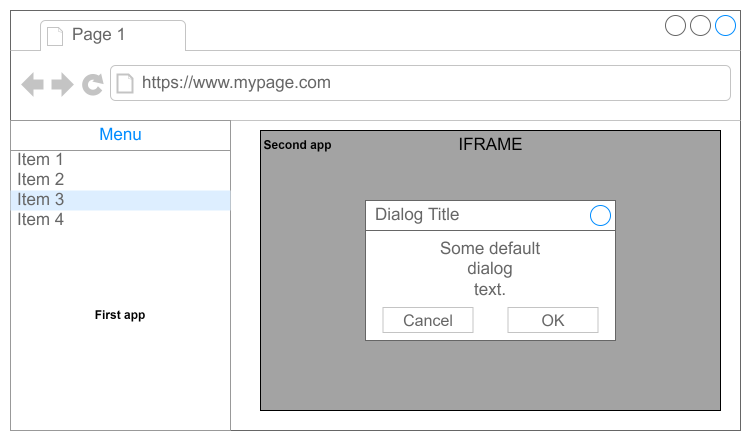
预期效果:
父应用iframe代码:
<iframe id="iframe" allowfullscreen [hidden]="condition" scrolling="no" [src]="url | domsecure" title="Navigation"></iframe>
子应用调用Dialog的代码:
import { Component } from '@angular/core';
import { MatDialog } from '@angular/material/dialog';
import { DialogComponent } from '../dialog/dialog.component';

@Component({
  selector: 'app-test',
  templateUrl: './test.component.html',
  styleUrls: ['./test.component.css']
})
export class TestComponent {

  constructor(private matDialog: MatDialog) { }

  public showDialog(): void {
    this.matDialog.open(DialogComponent);
  }

}
使用版本:Angular 11.0.5
解决方案
1. 同域场景:利用 appendTo 配置挂载Dialog到父窗口
Angular Material Dialog 支持指定挂载节点,直接将Dialog挂载到父窗口的DOM中即可实现全局居中。
修改子应用中打开Dialog的代码:
public showDialog(): void {
  // 获取父窗口的body元素(同域下可直接访问)
  const parentBody = window.parent.document.body;
  this.matDialog.open(DialogComponent, {
    // 将Dialog挂载到父窗口body
    appendTo: parentBody as HTMLElement,
    // 可附加自定义尺寸配置
    width: '600px',
    height: '400px'
  });
}
注意:此方案仅适用于父、子应用同域的情况,否则会触发浏览器跨域安全限制。
2. 跨域场景:通过 postMessage 通信在父应用中打开Dialog
如果父、子应用不同域,无法直接访问父窗口DOM,需通过跨域消息通信实现:
子应用侧:发送打开Dialog的请求
public showDialog(): void {
  // 向父应用发送消息,建议替换为父应用具体域名提升安全性
  window.parent.postMessage({
    type: 'OPEN_DIALOG',
    dialogConfig: {
      width: '600px',
      height: '400px'
    }
  }, '*');
}
父应用侧:监听消息并打开Dialog
首先确保父应用已引入Angular Material,创建对应Dialog组件后,添加消息监听:
import { Component, OnInit } from '@angular/core';
import { MatDialog } from '@angular/material/dialog';
import { DialogComponent } from './dialog/dialog.component';

@Component({
  selector: 'app-parent',
  templateUrl: './parent.component.html',
  styleUrls: ['./parent.component.css']
})
export class ParentComponent implements OnInit {

  constructor(private matDialog: MatDialog) { }

  ngOnInit(): void {
    window.addEventListener('message', (event) => {
      // 验证消息来源,避免恶意请求
      if (event.origin !== '子应用域名') return;

      if (event.data.type === 'OPEN_DIALOG') {
        this.matDialog.open(DialogComponent, event.data.dialogConfig);
      }
    });
  }
}
3. 样式适配补充
- 若父应用未引入Angular Material样式,需确保子应用的全局样式能覆盖父窗口中Dialog的样式,或在父应用中同步引入Material样式。
- 可通过Dialog的
position配置手动调整位置,比如强制居中:
this.matDialog.open(DialogComponent, {
  appendTo: parentBody as HTMLElement,
  position: {
    top: '50%',
    left: '50%'
  },
  panelClass: 'dialog-center'
});
配合全局CSS:
.dialog-center {
  transform: translate(-50%, -50%) !important;
}
内容的提问来源于stack exchange,提问作者Fredy Gamba
相关产品推荐
相关产品推荐


