
Rx文件监控系统节流缓冲发射:除GroupByUntil外的实现方案?

2026-8-14
文件监控系统的变更缓冲节流实现
我正在开发一套文件监控系统,需求是记录每一处文件变更,将变更收集至缓冲区后执行节流发射。具体来说,当有变更发生时开始记录缓冲区,若200ms内无新变更,则发射所有已记录的变更(支持逐个或集合形式发射)。Throttle方法无法满足需求,因为它仅返回每组中的最后一个元素(如下图所示的绿色和紫色点)。
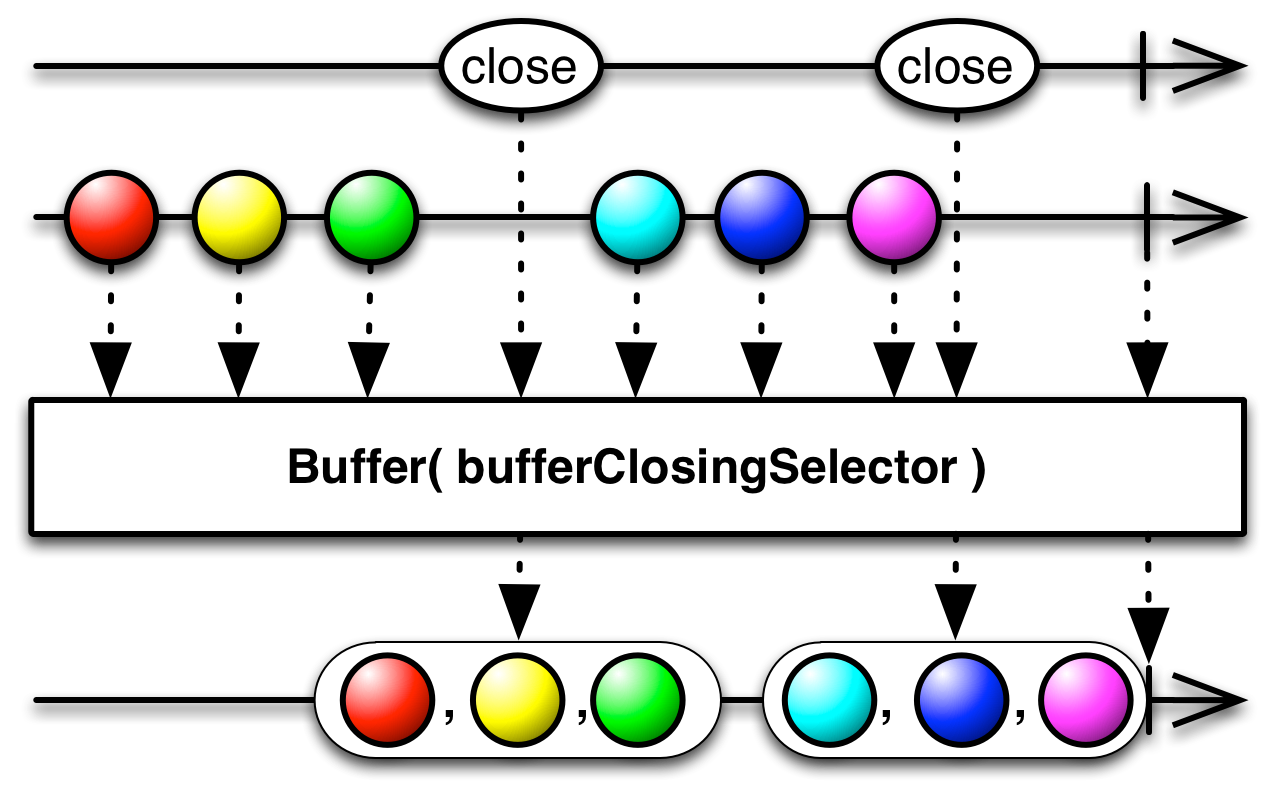
我已按照Stack Overflow用户cwharris的回答建议,使用GroupByUntil编写了如下代码:
using var watcher = new FileSystemWatcher("some_path")
{
    Filter = "*.*",
    NotifyFilter = NotifyFilters.FileName | NotifyFilters.Size,
    IncludeSubdirectories = true,
    EnableRaisingEvents = true,
};

var Files = Observable.FromEventPattern<FileSystemEventHandler, FileSystemEventArgs>(
    h => watcher.Created += h, h => watcher.Created -= h)
    .Select(x => x.EventArgs.FullPath)
    .GroupByUntil(x => true, g => g.Throttle(TimeSpan.FromMilliseconds(200)))
    .SelectMany(x => x.ToArray());


using IDisposable handle = Files.Subscribe(x => Console.WriteLine(String.Join("\n", x)));
请问是否存在其他实现方式?例如使用Buffer和bufferClosingSelector?
当然可以用Buffer操作符结合节流信号来实现,这种方式更直观简洁,核心思路是用变更流的节流信号作为缓冲区的关闭触发条件:
当文件变更流中出现元素时,Throttle会启动200ms的计时;如果200ms内没有新元素,Throttle就会发出信号,此时Buffer就会关闭当前缓冲区,把收集到的所有变更一次性发射出去。
示例代码如下:
using var watcher = new FileSystemWatcher("some_path")
{
    Filter = "*.*",
    NotifyFilter = NotifyFilters.FileName | NotifyFilters.Size,
    IncludeSubdirectories = true,
    EnableRaisingEvents = true,
};

// 先获取文件变更的Observable流
var fileChanges = Observable.FromEventPattern<FileSystemEventHandler, FileSystemEventArgs>(
        h => watcher.Created += h, h => watcher.Created -= h)
    .Select(x => x.EventArgs.FullPath);

// 生成缓冲区关闭信号:200ms无新变更时触发
var bufferCloseSignal = fileChanges.Throttle(TimeSpan.FromMilliseconds(200));

// 用Buffer监听关闭信号,信号触发时发射当前缓冲区的所有变更
var bufferedFileChanges = fileChanges.Buffer(bufferCloseSignal);

using IDisposable handle = bufferedFileChanges.Subscribe(x => Console.WriteLine(String.Join("\n", x)));
另外,也可以使用Buffer的另一个重载Buffer(Func<IObservable<Unit>> bufferClosingSelector),通过自定义关闭逻辑实现相同效果:
var bufferedFileChanges = fileChanges.Buffer(() =>
    // 每当缓冲区开始收集元素后,启动200ms定时器,新元素会重置这个定时器
    fileChanges.Throttle(TimeSpan.FromMilliseconds(200))
        .Select(_ => Unit.Default)
);
这两种基于Buffer的实现,都能精准满足你的需求:收集一段时间内的所有变更,在节流时间结束后批量发射。
内容的提问来源于stack exchange,提问作者Eric Qiang
相关产品推荐
相关产品推荐


