
iOS 16 SwiftUI侧滑返回时键盘安全区域更新异常求助

2026-8-14
iOS 16 SwiftUI侧滑返回后键盘安全区域不更新Bug分析与解决方案
这是iOS 16上SwiftUI开发的典型问题:推送包含TextField的页面后,侧滑返回原页面,键盘安全区域无法正常更新,同时控制台会输出键盘相关的约束冲突日志。
问题演示
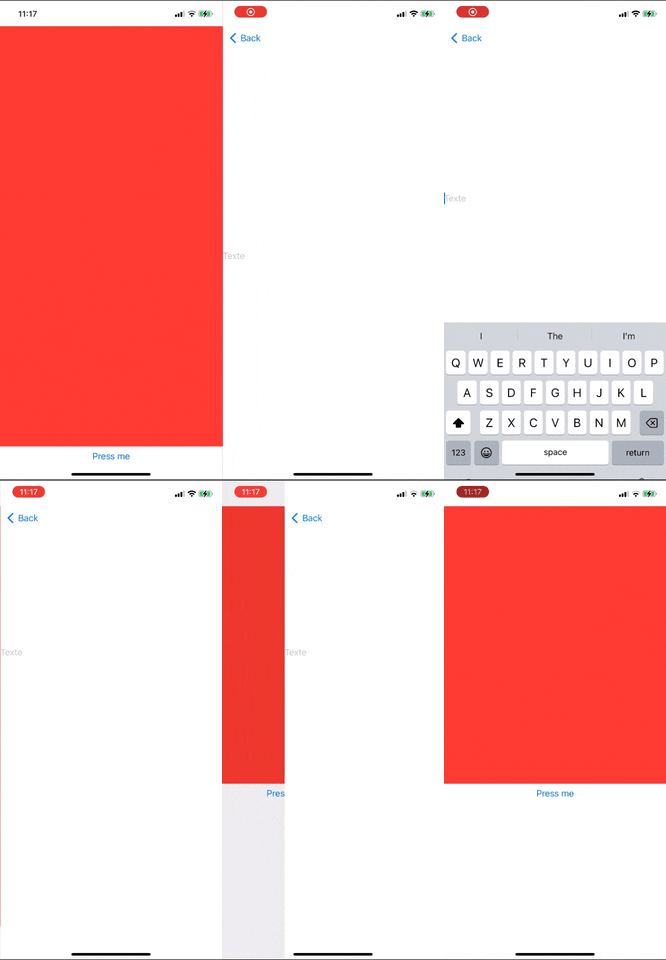
复现代码
var body: some View {
    NavigationView {
        ZStack {
            VStack {
                ScrollView {
                    ForEach(0..<40) { _ in
                        Color.red.frame(height: 30)
                    }
                }
                NavigationLink {
                    TextField("Text", text: .constant(""))
                } label: {
                    Text("Press me")
                }
            }
        }
    }
    .navigationViewStyle(.stack)
}
约束冲突日志
2022-11-02 10:33:00.540667+0200 SomeSUITestProj[22423:5008601] [LayoutConstraints] Unable to simultaneously satisfy constraints.
    Probably at least one of the constraints in the following list is one you don't want.
    Try this:
        (1) look at each constraint and try to figure out which you don't expect;
        (2) find the code that added the unwanted constraint or constraints and fix it.
(
    "<NSLayoutConstraint:0x283177f70 'accessoryView.bottom' _UIRemoteKeyboardPlaceholderView:0x151210eb0.bottom == _UIKBCompatInputView:0x15120d500.top   (active)>",
    "<NSLayoutConstraint:0x28310cd20 'assistantHeight' SystemInputAssistantView.height == 45   (active, names: SystemInputAssistantView:0x15120b840 )>",
    "<NSLayoutConstraint:0x283120a50 'assistantView.bottom' SystemInputAssistantView.bottom == _UIKBCompatInputView:0x15120d500.top   (active, names: SystemInputAssistantView:0x15120b840 )>",
    "<NSLayoutConstraint:0x2831219f0 'assistantView.top' V:[_UIRemoteKeyboardPlaceholderView:0x151210eb0]-(0)-[SystemInputAssistantView]   (active, names: SystemInputAssistantView:0x15120b840 )>"
)

Will attempt to recover by breaking constraint
<NSLayoutConstraint:0x2831219f0 'assistantView.top' V:[_UIRemoteKeyboardPlaceholderView:0x151210eb0]-(0)-[SystemInputAssistantView]   (active, names: SystemInputAssistantView:0x15120b840 )>

Make a symbolic breakpoint at UIViewAlertForUnsatisfiableConstraints to catch this in the debugger.
The methods in the UIConstraintBasedLayoutDebugging category on UIView listed in <UIKitCore/UIView.h> may also be helpful.
原因分析
从约束冲突日志可以看出,问题出在键盘占位视图(_UIRemoteKeyboardPlaceholderView)和系统输入助手视图(SystemInputAssistantView)的布局约束上。iOS 16的NavigationView在侧滑返回的过渡过程中,没有正确清理键盘相关的布局状态,导致返回原页面后,安全区域的计算逻辑出现混乱,进而引发约束冲突和视觉异常。
解决方案
1. 升级导航组件(推荐)
iOS 16.1及以上版本中,Apple修复了部分NavigationView的布局问题,同时推荐使用新的NavigationStack替代旧的NavigationView。替换后的代码如下:
var body: some View {
    NavigationStack {
        ZStack {
            VStack {
                ScrollView {
                    ForEach(0..<40) { _ in
                        Color.red.frame(height: 30)
                    }
                }
                NavigationLink("Press me") {
                    TextField("Text", text: .constant(""))
                }
            }
        }
    }
}
2. 手动触发布局刷新
在原页面的onAppear回调中,强制触发视图布局刷新,修复安全区域计算异常:
var body: some View {
    NavigationView {
        ZStack {
            VStack {
                ScrollView {
                    ForEach(0..<40) { _ in
                        Color.red.frame(height: 30)
                    }
                }
                NavigationLink {
                    TextField("Text", text: .constant(""))
                } label: {
                    Text("Press me")
                }
            }
        }
        .onAppear {
            DispatchQueue.main.async {
                UIApplication.shared.windows.first?.layoutIfNeeded()
            }
        }
    }
    .navigationViewStyle(.stack)
}
或者通过修改视图id强制重新渲染:
@State private var viewId = UUID()

var body: some View {
    NavigationView {
        ZStack {
            VStack {
                ScrollView {
                    ForEach(0..<40) { _ in
                        Color.red.frame(height: 30)
                    }
                }
                NavigationLink {
                    TextField("Text", text: .constant(""))
                } label: {
                    Text("Press me")
                }
            }
        }
        .id(viewId)
        .onAppear {
            viewId = UUID()
        }
    }
    .navigationViewStyle(.stack)
}
3. 禁用系统输入助手视图
通过UIKit的外观设置隐藏输入助手视图,减少约束冲突的可能性:
@main
struct YourApp: App {
    init() {
        UITextField.appearance().inputAssistantItem.leadingBarButtonGroups = []
        UITextField.appearance().inputAssistantItem.trailingBarButtonGroups = []
    }

    var body: some Scene {
        WindowGroup {
            ContentView()
        }
    }
}
内容的提问来源于stack exchange,提问作者Mixorok
相关产品推荐
相关产品推荐


