
如何实现指定样式按钮?使用Elevated Button失败求解决方案

2026-8-6
实现大红色立体按钮方案
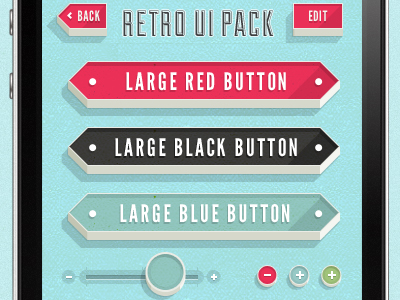
针对你要实现的大红色按钮,以下两种方案可以达到设计图效果:
方案一:用原生ElevatedButton自定义实现
无需依赖第三方包,通过配置样式属性模拟立体按压效果:
ElevatedButton(
  onPressed: () {
    Navigator.pushNamed(context, '/match', arguments: {'mode': Mode.PVP});
  },
  style: ElevatedButton.styleFrom(
    minimumSize: const Size(double.infinity, 60),
    elevation: 8,
    shadowColor: Colors.white.withOpacity(0.1),
    shape: RoundedRectangleBorder(
      borderRadius: BorderRadius.circular(8), // 可根据设计调整圆角
    ),
    backgroundColor: const Color.fromARGB(255, 229, 57, 53), // 匹配设计的大红色
    foregroundColor: Colors.white,
    overlayColor: Colors.white.withOpacity(0.2), // 按压时的高亮效果
  ),
  child: const Text(
    'VS PLAYER',
    style: TextStyle(
      fontSize: 16,
      fontWeight: FontWeight.bold,
      letterSpacing: 1.2,
    ),
  ),
)
方案二:完善第三方PushableButton的配置
如果继续使用你贴出的PushableButton(需依赖pushable_button包),调整细节匹配设计:
- 先在
pubspec.yaml添加依赖:
dependencies:
  pushable_button: ^1.0.0 # 请使用最新版本
- 优化后的按钮代码:
PushableButton(
  height: 60,
  elevation: 8,
  borderRadius: 8, // 添加圆角贴近设计
  hslColor: HSLColor.fromAHSL(1.0, 347, 0.81, 0.55),
  shadow: const BoxShadow(
    color: Color.fromARGB(26, 255, 255, 255),
    spreadRadius: 5,
    blurRadius: 7,
    offset: Offset(0, 2),
  ),
  child: const Text(
    'VS PLAYER',
    style: TextStyle(
      color: Colors.white,
      fontSize: 16,
      fontWeight: FontWeight.bold,
      letterSpacing: 1.2,
    ),
  ),
  onPressed: () {
    Navigator.pushNamed(
      context,
      '/match',
      arguments: {
        'mode': Mode.PVP,
      },
    );
  },
)
编辑小按钮实现
针对图中的编辑按钮,可用OutlinedButton快速实现:
OutlinedButton.icon(
  onPressed: () {
    // 编辑操作逻辑
  },
  icon: const Icon(Icons.edit, color: Colors.white),
  label: const Text('编辑', style: TextStyle(color: Colors.white)),
  style: OutlinedButton.styleFrom(
    side: const BorderSide(color: Colors.white),
    elevation: 4,
    shadowColor: Colors.white.withOpacity(0.1),
    backgroundColor: const Color.fromARGB(255, 229, 57, 53),
  ),
)
内容的提问来源于stack exchange,提问作者Tdayo
相关产品推荐
相关产品推荐


