
Flutter中禁止ListWheelScrollView首个项滚动的bug修复问题

2026-7-21
ListWheelScrollView 禁用项滚动拦截修复
需求描述
实现ListWheelScrollView在遇到首个禁用项时停止滚动,不允许滚动到该禁用项,滚动索引不应包含首个禁用项。预期效果参考: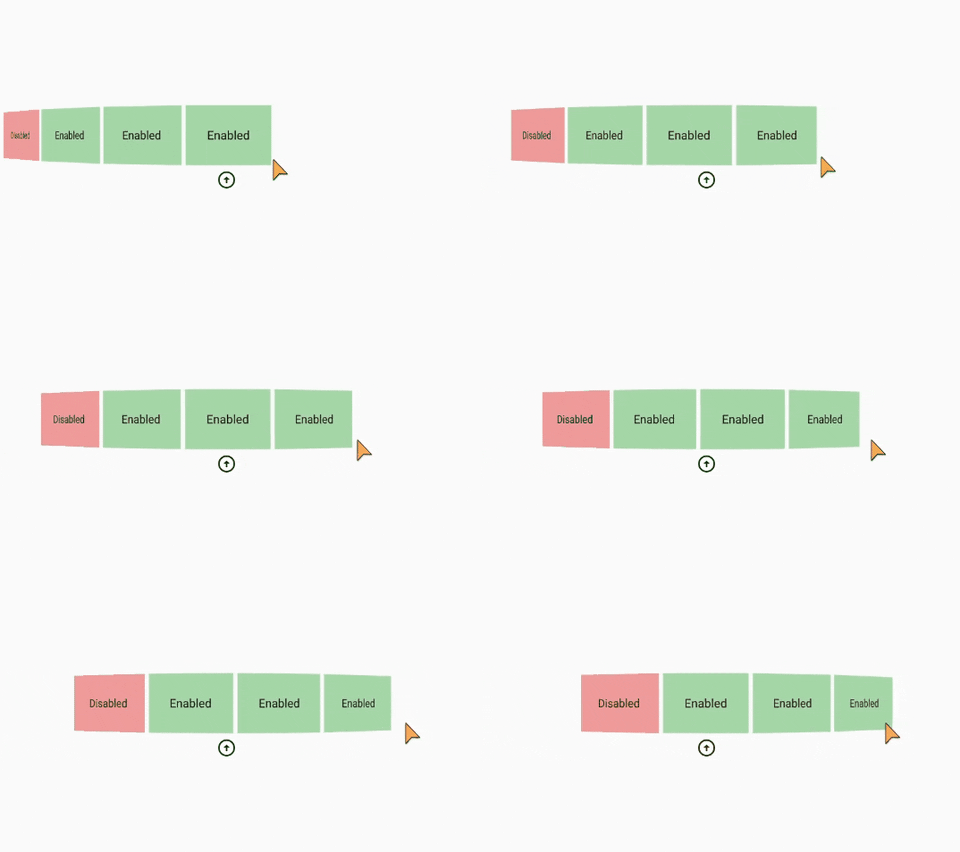
初始代码
import 'package:flutter/material.dart';

void main() => runApp(const MyApp());

class MyApp extends StatelessWidget {
  const MyApp({Key? key}) : super(key: key);
  @override
  Widget build(BuildContext context) {
    return MaterialApp(
      title: 'List',
      theme: ThemeData(
        primarySwatch: Colors.blue,
      ),
      debugShowCheckedModeBanner: false,
      home: const List(),
    );
  }
}

class List extends StatefulWidget {
  const List({Key? key}) : super(key: key);
  @override
  _ListState createState() => _ListState();
}

class _ListState extends State<List> {
  @override
  Widget build(BuildContext context) {
    return Scaffold(
        appBar: AppBar(
          title: const Text("List"),
          backgroundColor: Colors.green,
        ),
        body: Center(
          child: Stack(
            alignment: AlignmentDirectional.center,
            children: [
              RotatedBox(
                quarterTurns: 1,
                child: SizedBox(
                  height: 600,
                  width: 800,
                  child: ListWheelScrollView(
                      itemExtent: 100,
                      physics: const FixedExtentScrollPhysics(),
                      onSelectedItemChanged: (value) {},
                      children: [
                        for (int i = 0; i < 4; i++) ...[
                          Container(
                            color: i != 3 ? Colors.green[200] : Colors.red[200],
                            height: 70,
                            width: 70,
                            alignment: Alignment.center,
                            child: RotatedBox(
                                quarterTurns: -1,
                                child: Text(i != 3 ? "Enabled" : "Disabled")),
                          )
                        ]
                      ]),
                ),
              ),
              const Positioned(top: 440, child: Icon(Icons.arrow_circle_up))
            ],
          ),
        ));
  }
}
存在Bug的解决方案
import 'package:flutter/material.dart';

void main() => runApp(const MyApp());

class MyApp extends StatelessWidget {
  const MyApp({Key? key}) : super(key: key);
  @override
  Widget build(BuildContext context) {
    return MaterialApp(
      title: 'List',
      theme: ThemeData(
        primarySwatch: Colors.blue,
      ),
      debugShowCheckedModeBanner: false,
      home: const ScrollingList(),
    );
  }
}

class ScrollingList extends StatefulWidget {
  const ScrollingList({Key? key}) : super(key: key);

  @override
  _ScrollingListState createState() => _ScrollingListState();
}

class _ScrollingListState extends State<ScrollingList> {
  final controller = FixedExtentScrollController();

  final children = [
    for (int i = 0; i < 6; i++) ScrollingListItem(enabled: i != 0)
  ];

  @override
  void dispose() {
    controller.dispose();
    super.dispose();
  }

  @override
  Widget build(BuildContext context) {
    return Scaffold(
        appBar: AppBar(
          title: const Text("List"),
          backgroundColor: Colors.green,
        ),
        body: Center(
          child: Stack(
            alignment: AlignmentDirectional.center,
            children: [
              RotatedBox(
                quarterTurns: 1,
                child: SizedBox(
                  height: 600,
                  width: 800,
                  child: ListWheelScrollView(
                    controller: controller,
                    itemExtent: 100,
                    physics: const FixedExtentScrollPhysics(),
                    onSelectedItemChanged: (idx) {
                      if (!children[idx].enabled) {
                        controller.animateToItem(
                          idx + 1,
                          duration: const Duration(milliseconds: 500),
                          curve: Curves.linear,
                        );
                      }
                    },
                    children: children,
                  ),
                ),
              ),
              const Positioned(top: 440, child: Icon(Icons.arrow_circle_up))
            ],
          ),
        ));
  }
}

class ScrollingListItem extends StatelessWidget {
  final bool enabled;

  const ScrollingListItem({super.key, required this.enabled});

  @override
  Widget build(BuildContext context) {
    return Container(
      color: enabled ? Colors.green[200] : Colors.red[200],
      height: 70,
      width: 70,
      alignment: Alignment.center,
      child: RotatedBox(
        quarterTurns: -1,
        child: Text(
          enabled ? "Enabled" : "Disabled",
        ),
      ),
    );
  }
}
Bug描述
该解决方案存在问题:当滚动到禁用项时,最左侧的最后一个元素会出现闪烁现象,效果参考: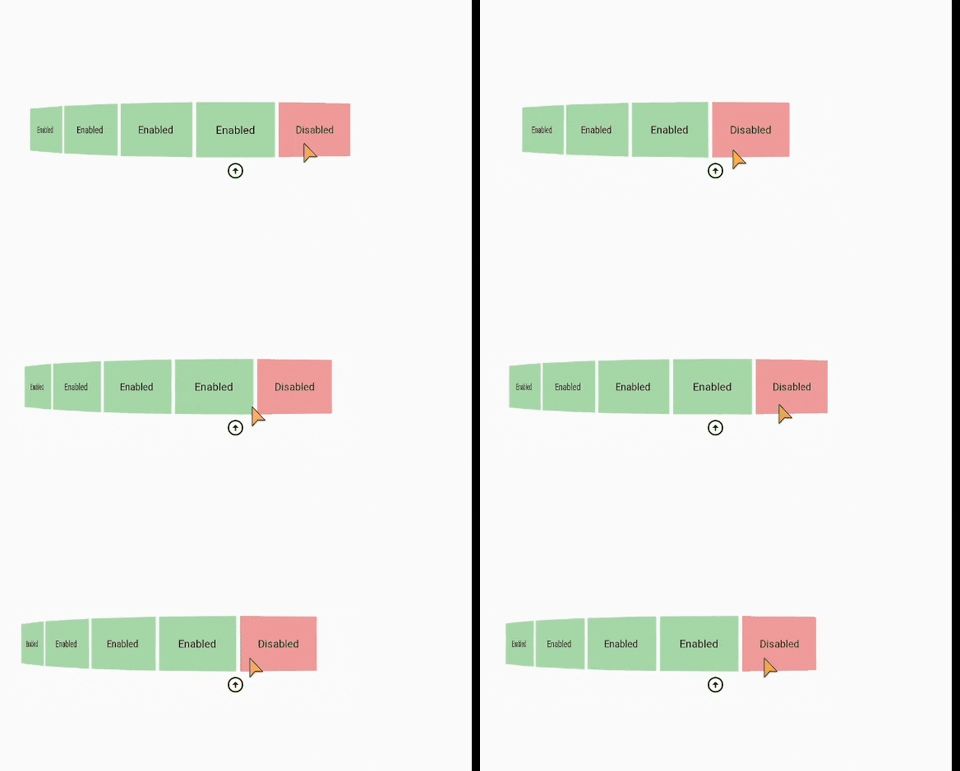
问题原因分析
问题出在onSelectedItemChanged回调中触发animateToItem的逻辑:当选中禁用项时才触发滚动回退,此时禁用项已经被选中并显示在选中位置,然后才执行动画滚动到下一个有效项,这就导致了禁用项短暂显示,进而引发视觉闪烁。此外,原方案没有限制滚动的边界,允许滚动到禁用项的位置后再修正,这是触发闪烁的核心原因。
修复方案
我们需要自定义滚动物理类(FixedExtentScrollPhysics的子类),在滚动过程中直接拦截到禁用项的滚动动作,提前阻止滚动到禁用项位置,而不是在选中后再修正。具体步骤:
- 自定义
DisabledItemScrollPhysics,重写相关方法限制滚动范围,禁止滚动到禁用项的索引位置。 - 调整控制器的初始位置,确保默认选中有效项。
- 移除
onSelectedItemChanged中的动画修正逻辑,改为通过物理规则提前拦截。
修复后的完整代码
import 'package:flutter/material.dart';

void main() => runApp(const MyApp());

class MyApp extends StatelessWidget {
  const MyApp({Key? key}) : super(key: key);
  @override
  Widget build(BuildContext context) {
    return MaterialApp(
      title: 'List',
      theme: ThemeData(
        primarySwatch: Colors.blue,
      ),
      debugShowCheckedModeBanner: false,
      home: const ScrollingList(),
    );
  }
}

class ScrollingList extends StatefulWidget {
  const ScrollingList({Key? key}) : super(key: key);

  @override
  _ScrollingListState createState() => _ScrollingListState();
}

class _ScrollingListState extends State<ScrollingList> {
  final controller = FixedExtentScrollController(initialItem: 1); // 默认选中第一个有效项

  final children = [
    for (int i = 0; i < 6; i++) ScrollingListItem(enabled: i != 0)
  ];

  @override
  void dispose() {
    controller.dispose();
    super.dispose();
  }

  @override
  Widget build(BuildContext context) {
    return Scaffold(
        appBar: AppBar(
          title: const Text("List"),
          backgroundColor: Colors.green,
        ),
        body: Center(
          child: Stack(
            alignment: AlignmentDirectional.center,
            children: [
              RotatedBox(
                quarterTurns: 1,
                child: SizedBox(
                  height: 600,
                  width: 800,
                  child: ListWheelScrollView(
                    controller: controller,
                    itemExtent: 100,
                    // 使用自定义物理类拦截禁用项滚动
                    physics: DisabledItemScrollPhysics(
                      disabledIndices: const {0},
                      parent: const FixedExtentScrollPhysics(),
                    ),
                    onSelectedItemChanged: (idx) {},
                    children: children,
                  ),
                ),
              ),
              const Positioned(top: 440, child: Icon(Icons.arrow_circle_up))
            ],
          ),
        ));
  }
}

class ScrollingListItem extends StatelessWidget {
  final bool enabled;

  const ScrollingListItem({super.key, required this.enabled});

  @override
  Widget build(BuildContext context) {
    return Container(
      color: enabled ? Colors.green[200] : Colors.red[200],
      height: 70,
      width: 70,
      alignment: Alignment.center,
      child: RotatedBox(
        quarterTurns: -1,
        child: Text(
          enabled ? "Enabled" : "Disabled",
        ),
      ),
    );
  }
}

// 自定义滚动物理类,拦截禁用项的滚动
class DisabledItemScrollPhysics extends FixedExtentScrollPhysics {
  final Set<int> disabledIndices;

  const DisabledItemScrollPhysics({
    required this.disabledIndices,
    super.parent,
  });

  @override
  DisabledItemScrollPhysics applyTo(ScrollPhysics? ancestor) {
    return DisabledItemScrollPhysics(
      disabledIndices: disabledIndices,
      parent: buildParent(ancestor),
    );
  }

  @override
  double applyPhysicsToUserOffset(ScrollMetrics position, double offset) {
    final itemExtent = (position as FixedExtentMetrics).itemExtent;
    final currentIndex = position.itemIndex;
    final targetIndex = (position.pixels + offset) ~/ itemExtent;

    // 如果目标索引是禁用项,拦截滚动
    if (disabledIndices.contains(targetIndex)) {
      // 计算偏移量,确保停留在最近的有效索引位置
      final closestValidIndex = disabledIndices.contains(currentIndex)
          ? currentIndex + 1
          : currentIndex;
      final targetPixels = closestValidIndex * itemExtent;
      return targetPixels - position.pixels;
    }

    return super.applyPhysicsToUserOffset(position, offset);
  }

  @override
  ScrollPosition createScrollPosition(
    ScrollPhysics physics,
    ScrollContext context,
    ScrollPosition? oldPosition,
  ) {
    return _DisabledItemScrollPosition(
      physics: physics,
      context: context,
      oldPosition: oldPosition,
      disabledIndices: disabledIndices,
    );
  }
}

class _DisabledItemScrollPosition extends FixedExtentScrollPosition {
  final Set<int> disabledIndices;

  _DisabledItemScrollPosition({
    required super.physics,
    required super.context,
    super.oldPosition,
    required this.disabledIndices,
  });

  @override
  double setPixels(double newPixels) {
    final itemExtent = this.itemExtent;
    final targetIndex = newPixels ~/ itemExtent;

    // 如果目标索引是禁用项,修正到最近的有效索引
    if (disabledIndices.contains(targetIndex)) {
      final currentIndex = this.itemIndex;
      final validIndex = disabledIndices.contains(currentIndex)
          ? currentIndex + 1
          : currentIndex;
      return super.setPixels(validIndex * itemExtent);
    }

    return super.setPixels(newPixels);
  }
}
修复说明
- 自定义滚动物理类:通过
DisabledItemScrollPhysics和对应的ScrollPosition,在滚动过程中直接判断目标索引是否为禁用项,提前修正滚动位置,避免禁用项被选中显示。 - 初始位置设置:将控制器初始项设为1(第一个有效项),确保默认状态不会显示禁用项。
- 移除事后修正逻辑:删除了
onSelectedItemChanged中的动画回退代码,完全通过物理规则拦截滚动,从根源消除闪烁现象。
内容的提问来源于stack exchange,提问作者Ramji
相关产品推荐
相关产品推荐


