
如何配置Quarkus使用Java 17?解决switch表达式编译报错

2026-7-16
问题描述
我在build.gradle中明确指定使用Java 17,但构建时出现报错:switch语句中的模式是预览特性,默认禁用,需添加--enable-preview启用。我知道Switch表达式在Java 14已正式发布,不清楚哪里配置有误?还有其他需要指定Java版本或启用预览特性的地方吗?
配置文件内容
gradle.properties
quarkusPluginVersion=3.0.1.Final
quarkusPlatformArtifactId=quarkus-bom
quarkusPluginId=io.quarkus
quarkusPlatformGroupId=io.quarkus.platform
quarkusPlatformVersion=3.0.1.Final
settings.gradle
pluginManagement {
    repositories {
        mavenCentral()
        gradlePluginPortal()
        mavenLocal()
    }
    plugins {
        id "${quarkusPluginId}" version "${quarkusPluginVersion}"
    }
}
rootProject.name='upc'
build.gradle
buildscript {
    repositories {
        mavenCentral()
        gradlePluginPortal()
        mavenLocal()
    }
    dependencies {
        classpath 'com.h2database:h2:1.4.197'
    }
}


plugins {
    id 'java'
    id 'io.quarkus'
    id 'org.flywaydb.flyway' version '9.8.1'
}

repositories {
    mavenCentral()
    mavenLocal()
}

dependencies {
    def lombok_version = '1.18.26'
    def map_struct_version = '1.5.5.Final'

    implementation enforcedPlatform("${quarkusPlatformGroupId}:${quarkusPlatformArtifactId}:${quarkusPlatformVersion}")
    implementation 'io.quarkus:quarkus-resteasy-reactive-qute'
    implementation 'io.quarkus:quarkus-resteasy-reactive'
    implementation 'io.quarkus:quarkus-resteasy-reactive-jackson'
    implementation 'io.quarkus:quarkus-arc'
    implementation 'io.quarkus:quarkus-flyway'
    implementation 'io.quarkus:quarkus-hibernate-validator'
    implementation 'io.quarkiverse.jdbc:quarkus-jdbc-sqlite:3.0.5'
    implementation 'io.quarkiverse.mybatis:quarkus-mybatis:2.0.0'
    implementation 'org.jboss.logging:jboss-logging'
    implementation "org.mapstruct:mapstruct:${map_struct_version}"
    implementation 'com.google.guava:guava:31.1-jre'
    implementation 'com.fasterxml.jackson.datatype:jackson-datatype-guava:2.14.2'


    compileOnly "org.projectlombok:lombok:${lombok_version}"
    annotationProcessor "org.projectlombok:lombok:${lombok_version}"
    annotationProcessor "org.mapstruct:mapstruct-processor:${map_struct_version}"

    testCompileOnly "org.projectlombok:lombok:${lombok_version}"
    testAnnotationProcessor "org.projectlombok:lombok:${lombok_version}"
    testAnnotationProcessor "org.mapstruct:mapstruct-processor:${map_struct_version}"

    testImplementation 'io.quarkus:quarkus-junit5'
    testImplementation 'io.rest-assured:rest-assured'
}

group 'org.acanthite'
version '0.1'

java {
    sourceCompatibility = JavaVersion.VERSION_17
    targetCompatibility = JavaVersion.VERSION_17
}

test {
    systemProperty 'java.util.logging.manager', 'org.jboss.logmanager.LogManager'
}


compileJava {
    options.encoding = 'UTF-8'
    options.compilerArgs += [
            '-parameters',
            '-Amapstruct.defaultComponentModel=cdi',
            '-Amapstruct.defaultInjectionStrategy=constructor'
    ]
}

compileTestJava {
    options.encoding = 'UTF-8'
    options.compilerArgs += [
            '-parameters',
            '-Amapstruct.defaultComponentModel=cdi',
            '-Amapstruct.defaultInjectionStrategy=constructor'
    ]
}
IDEA项目设置截图
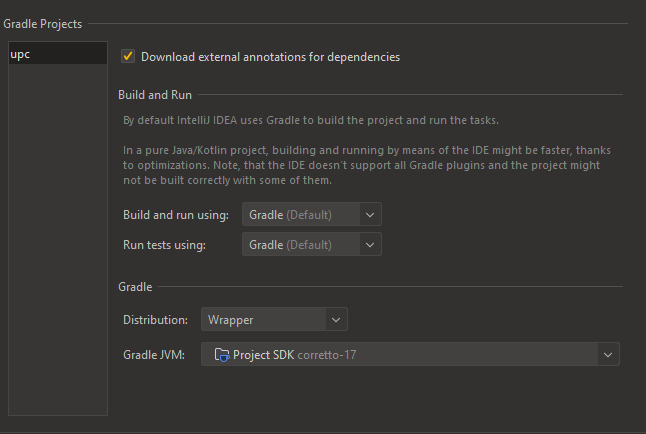
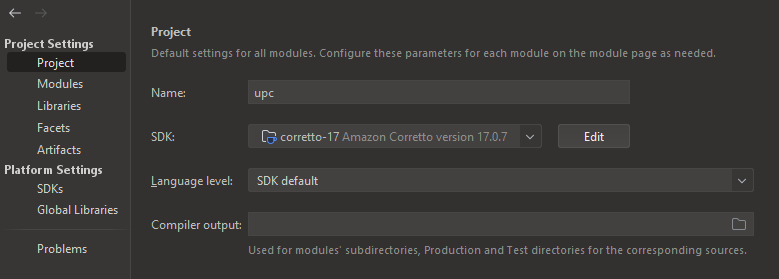
解决方案
首先要明确:你混淆了Switch表达式和Switch模式匹配两个特性:
- Switch表达式(比如
var result = switch(...) { ... };)确实在Java 14正式发布; - 但你代码中使用的Switch模式匹配(比如
case String s -> ...这种类型匹配语法)是Java 17的预览特性,默认禁用,必须显式启用才能编译。
1. Gradle编译配置添加预览参数
在build.gradle的compileJava和compileTestJava任务中,添加--enable-preview编译参数,同时指定--release 17确保编译目标版本正确:
compileJava {
    options.encoding = 'UTF-8'
    options.compilerArgs += [
            '--enable-preview',
            '--release', '17',
            '-parameters',
            '-Amapstruct.defaultComponentModel=cdi',
            '-Amapstruct.defaultInjectionStrategy=constructor'
    ]
}

compileTestJava {
    options.encoding = 'UTF-8'
    options.compilerArgs += [
            '--enable-preview',
            '--release', '17',
            '-parameters',
            '-Amapstruct.defaultComponentModel=cdi',
            '-Amapstruct.defaultInjectionStrategy=constructor'
    ]
}
2. 配置Quarkus运行时预览参数
Quarkus运行时也需要启用预览特性才能执行相关代码,在build.gradle中添加:
quarkus {
    jvmArgs = ['--enable-preview']
}
3. IDEA中启用预览特性
即使Gradle配置正确,IDEA也需要单独开启预览支持:
- 打开
File > Project Structure > Modules,选择对应模块,将Language level设为17 - Preview features; - 打开
File > Settings > Build, Execution, Deployment > Compiler > Java Compiler,在Additional command line parameters中添加--enable-preview。
4. 检查Gradle自身JVM版本
确保Gradle使用Java 17运行:
- 在项目根目录的
gradle.properties中添加:
org.gradle.java.home=/path/to/your/java17/jdk
或者在IDEA的Settings > Build, Execution, Deployment > Build Tools > Gradle中,将Gradle JVM设置为Java 17的JDK。
内容的提问来源于stack exchange,提问作者acanthite
相关产品推荐
相关产品推荐


