
Module Federation 请求远程组件时出现源地址错误问题

2026-6-17
问题:Next.js Module Federation 远程组件资源地址错误
我在Next.js中使用Module Federation插件,现有host(http://localhost:3000)和calc(http://localhost:3001)两个应用。访问calc应用时,尝试加载host的远程组件,浏览器请求的资源源地址不正确。
相关截图
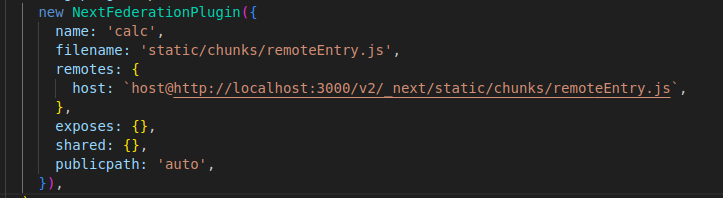
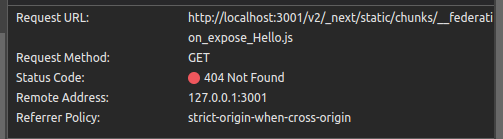
calc应用的nextjs.config.js配置
const { NextFederationPlugin } = require('@module-federation/nextjs-mf');
const path = require('path');

module.exports = {
  basePath: '/calc',
  webpack(config, options) {
    if (!options.isServer) {
      config.plugins.push(
        new NextFederationPlugin({
          name: 'calc',
          filename: 'static/chunks/remoteEntry.js',
          remotes: {
            host: `host@http://localhost:3000/v2/_next/static/chunks/remoteEntry.js`,
          },
          exposes: {},
          shared: {},
          publicpath: 'auto',
        }),
      );
    }

    return config;
  },
};
解决方案
问题出在两个核心配置错误:
- remote地址与host实际路径不匹配:先检查host应用的
next.config.js是否配置了basePath: '/v2'。如果host没有设置该前缀,必须把calc配置中remotes的地址改为host@http://localhost:3000/_next/static/chunks/remoteEntry.js,否则会请求不存在的路径。 - publicPath拼写错误:插件配置里的
publicpath应为驼峰式的publicPath(大写P),拼写错误会导致Module Federation无法正确计算远程资源的加载路径。
修正后的calc应用nextjs.config.js:
const { NextFederationPlugin } = require('@module-federation/nextjs-mf');
const path = require('path');

module.exports = {
  basePath: '/calc',
  webpack(config, options) {
    if (!options.isServer) {
      config.plugins.push(
        new NextFederationPlugin({
          name: 'calc',
          filename: 'static/chunks/remoteEntry.js',
          // 根据host实际basePath调整地址,示例为无basePath的情况
          remotes: {
            host: `host@http://localhost:3000/_next/static/chunks/remoteEntry.js`,
          },
          exposes: {},
          shared: {},
          // 修正拼写错误:publicpath → publicPath
          publicPath: 'auto',
        }),
      );
    }

    return config;
  },
};
额外注意:确保host应用的Module Federation配置正确暴露了组件,且remoteEntry.js的路径与calc配置一致。比如host的配置需包含:
new NextFederationPlugin({
  name: 'host',
  filename: 'static/chunks/remoteEntry.js',
  exposes: {
    './TargetComponent': './components/TargetComponent.js', // 明确要暴露的组件路径
  },
  // 如果host确实配置了basePath,这里要同步设置basePath: '/v2'
})
内容的提问来源于stack exchange,提问作者Leonardo Lima
相关产品推荐
相关产品推荐


