
Eclipse 2024-09插件安装卡顿求助:进程停滞无报错

2026-6-16
问题:Eclipse 2024-09插件安装随机卡顿无报错
环境与需求
- Windows系统,Eclipse 2024-09(buildId=4.33.0.20240905-0613)
- JDK版本:Eclipse Adoptium 21.0.4
- 需要安装的插件:Checkstyle、SpotBugs、SubEclipse、Eclipse Web Developer Tools
现象
- 安装流程:
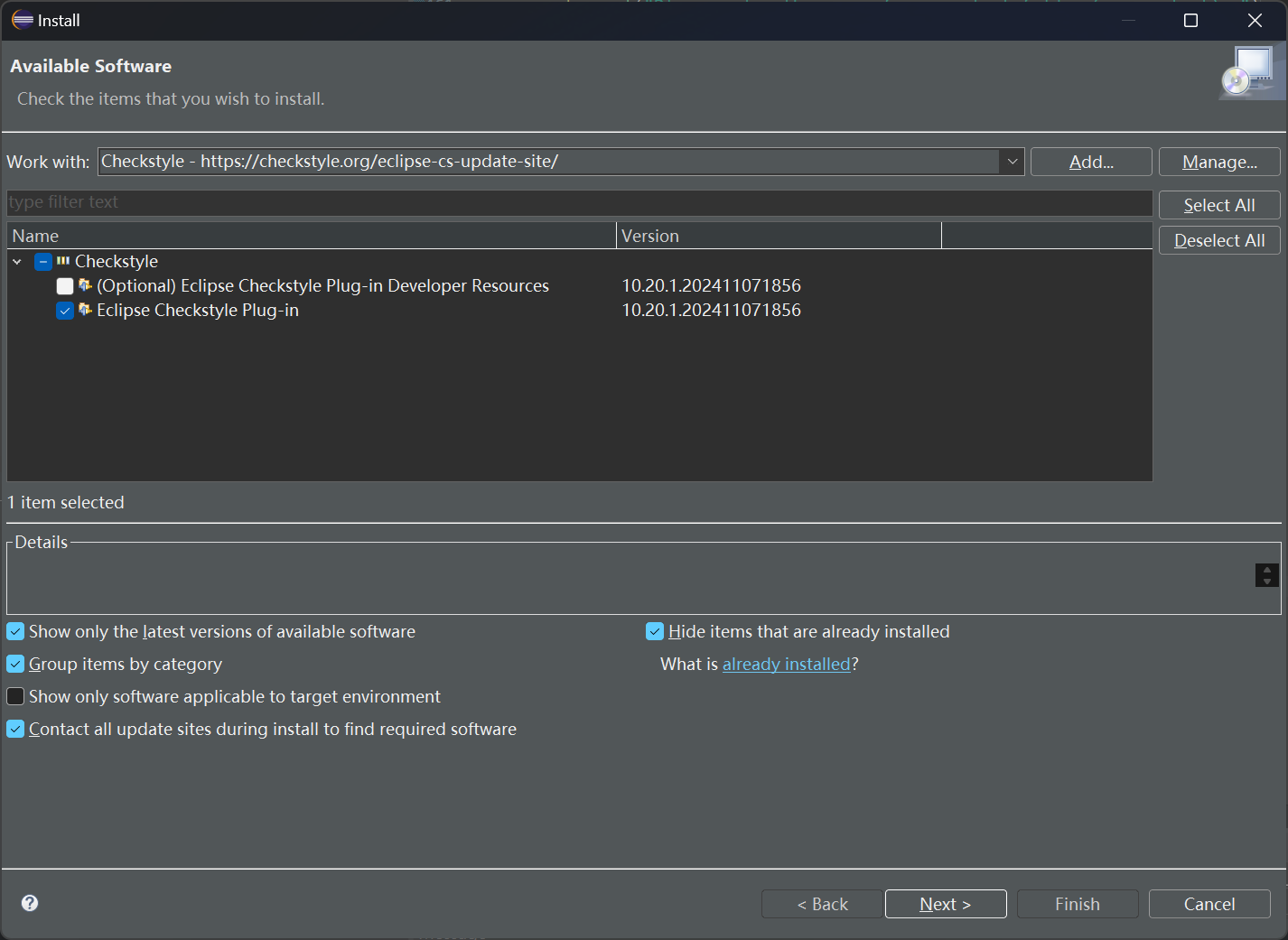
Help -> Install New Software... -> Add...(填写名称和网络地址)->Next/Finish - 多次尝试均在安装过程中随机位置卡顿(显示“正在获取资源”),每次卡顿环节不同,无报错信息
- 此前Eclipse 2024-06也曾出现相同问题,当时已解决但遗忘方法,切换至2024-09后问题重现
已尝试的操作
- 在偏好设置中勾选“Trust all content”,无效
- 推测是证书信任问题,但安装过程未出现信任选择界面
相关截图
- 安装页面(默认选项勾选):
- 安装CheckStyle时卡顿:

- 另一次尝试时卡顿:

- 第三次尝试时卡顿在其他环节:

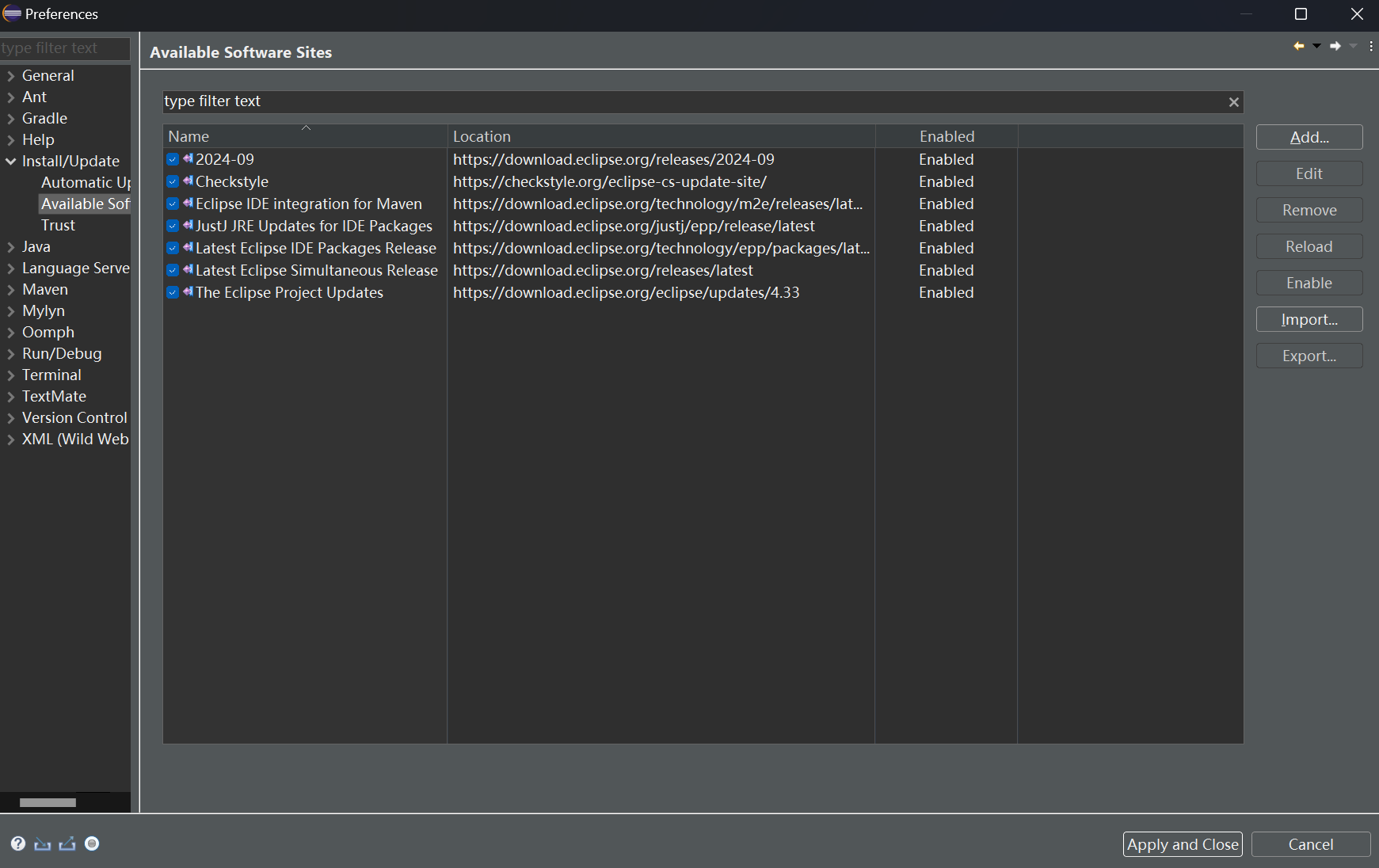
- Preferences -> Install/Update -> Available Software Sites界面:
- Error Log视图内容:

Eclipse日志
!SESSION 2024-11-15 14:47:07.473 -----------------------------------------------
eclipse.buildId=4.33.0.20240905-0613
java.version=21.0.4
java.vendor=Eclipse Adoptium
BootLoader constants: OS=win32, ARCH=x86_64, WS=win32, NL=zh_CN
Framework arguments:  -product org.eclipse.epp.package.java.product
Command-line arguments:  -os win32 -ws win32 -arch x86_64 -product org.eclipse.epp.package.java.product

!ENTRY ch.qos.logback.classic 1 0 2024-11-15 14:47:10.082
!MESSAGE Activated before the state location was initialized. Retry after the state location is initialized.

!ENTRY ch.qos.logback.classic 1 0 2024-11-15 14:47:11.196
!MESSAGE Logback config file: D:\Desktop\landepen\OSU-CSE-2221\workspace\.metadata\.plugins\org.eclipse.m2e.logback\logback.2.6.1.20240411-1122.xml

!ENTRY org.eclipse.egit.ui 2 0 2024-11-15 14:47:16.167
!MESSAGE Warning: The environment variable HOME is not set. The following directory will be used to store the Git
user global configuration and to define the default location to store repositories: 'C:\Users\123'. If this is
not correct please set the HOME environment variable and restart Eclipse. Otherwise Git for Windows and
EGit might behave differently since they see different configuration options.
This warning can be switched off on the Team > Git > Confirmations and Warnings preference page.

!ENTRY org.eclipse.core.jobs 2 2 2024-11-15 14:52:13.623
!MESSAGE Job found still running after platform shutdown.  Jobs should be canceled by the plugin that scheduled them during shutdown: org.eclipse.equinox.p2.operations.ProfileModificationJob RUNNING
     at java.base/jdk.internal.misc.Unsafe.park(Native Method)
     at java.base/java.util.concurrent.locks.LockSupport.park(LockSupport.java:221)
     at java.base/java.util.concurrent.CompletableFuture$Signaller.block(CompletableFuture.java:1864)
     at java.base/java.util.concurrent.ForkJoinPool.unmanagedBlock(ForkJoinPool.java:3780)
     at java.base/java.util.concurrent.ForkJoinPool.managedBlock(ForkJoinPool.java:3725)
     at java.base/java.util.concurrent.CompletableFuture.waitingGet(CompletableFuture.java:1898)
     at java.base/java.util.concurrent.CompletableFuture.get(CompletableFuture.java:2072)
     at org.eclipse.equinox.internal.p2.engine.phases.AuthorityChecker.lambda$10(AuthorityChecker.java:268)
     at java.base/java.util.Optional.ifPresent(Optional.java:178)
     at org.eclipse.equinox.internal.p2.engine.phases.AuthorityChecker.gatherCertificates(AuthorityChecker.java:266)
     at org.eclipse.equinox.internal.p2.engine.phases.AuthorityChecker.getCertificates(AuthorityChecker.java:246)
     at org.eclipse.equinox.internal.p2.engine.phases.AuthorityChecker.start(AuthorityChecker.java:125)
     at org.eclipse.equinox.internal.p2.engine.phases.Collect.completePhase(Collect.java:97)
     at org.eclipse.equinox.internal.p2.engine.Phase.postPerform(Phase.java:254)
     at org.eclipse.equinox.internal.p2.engine.Phase.perform(Phase.java:105)
     at org.eclipse.equinox.internal.p2.engine.PhaseSet.perform(PhaseSet.java:65)
     at org.eclipse.equinox.internal.p2.engine.Engine.perform(Engine.java:95)
     at org.eclipse.equinox.internal.p2.engine.Engine.perform(Engine.java:49)
     at org.eclipse.equinox.p2.operations.ProvisioningSession.performProvisioningPlan(ProvisioningSession.java:175)
     at org.eclipse.equinox.p2.operations.ProfileModificationJob.runModal(ProfileModificationJob.java:76)
     at org.eclipse.equinox.p2.operations.ProvisioningJob.run(ProvisioningJob.java:187)
     at org.eclipse.core.internal.jobs.Worker.run(Worker.java:63)
jcmd线程信息
"Worker-1: Installing Software" #74 [19812] prio=5 os_prio=0 cpu=468.75ms elapsed=452.35s tid=0x00000298917e9110 nid=19812 waiting on condition  [0x000000a64083e000]
   java.lang.Thread.State: WAITING (parking)
        at jdk.internal.misc.Unsafe.park(java.base@21.0.4/Native Method)
        - parking to wait for  <0x00000000c7700090> (a java.util.concurrent.CompletableFuture$Signaller)
        at java.util.concurrent.locks.LockSupport.park(java.base@21.0.4/LockSupport.java:221)
        at java.util.concurrent.CompletableFuture$Signaller.block(java.base@21.0.4/CompletableFuture.java:1864)
        at java.util.concurrent.ForkJoinPool.unmanagedBlock(java.base@21.0.4/ForkJoinPool.java:3780)
        at java.util.concurrent.ForkJoinPool.managedBlock(java.base@21.0.4/ForkJoinPool.java:3725)
        at java.util.concurrent.CompletableFuture.waitingGet(java.base@21.0.4/CompletableFuture.java:1898)
        at java.util.concurrent.CompletableFuture.get(java.base@21.0.4/CompletableFuture.java:2072)
        at org.eclipse.equinox.internal.p2.engine.phases.AuthorityChecker.lambda$10(AuthorityChecker.java:268)
        at org.eclipse.equinox.internal.p2.engine.phases.AuthorityChecker$$Lambda/0x0000000100fb28b8.accept(Unknown Source)
        at java.util.Optional.ifPresent(java.base@21.0.4/Optional.java:178)
        at org.eclipse.equinox.internal.p2.engine.phases.AuthorityChecker.gatherCertificates(AuthorityChecker.java:266)
        at org.eclipse.equinox.internal.p2.engine.phases.AuthorityChecker.getCertificates(AuthorityChecker.java:246)
        at org.eclipse.equinox.internal.p2.engine.phases.AuthorityChecker.start(AuthorityChecker.java:125)
        at org.eclipse.equinox.internal.p2.engine.phases.Collect.completePhase(Collect.java:97)
        at org.eclipse.equinox.internal.p2.engine.Phase.postPerform(Phase.java:254)
        at org.eclipse.equinox.internal.p2.engine.Phase.perform(Phase.java:105)
        at org.eclipse.equinox.internal.p2.engine.PhaseSet.perform(PhaseSet.java:65)
        at org.eclipse.equinox.internal.p2.engine.Engine.perform(Engine.java:95)
        at org.eclipse.equinox.internal.p2.engine.Engine.perform(Engine.java:49)
        at org.eclipse.equinox.p2.operations.ProvisioningSession.performProvisioningPlan(ProvisioningSession.java:175)
        at org.eclipse.equinox.p2.operations.ProfileModificationJob.runModal(ProfileModificationJob.java:76)
        at org.eclipse.equinox.p2.operations.ProvisioningJob.run(ProvisioningJob.java:187)
        at org.eclipse.core.internal.jobs.Worker.run(Worker.java:63)
解决建议
1. 禁用p2证书检查
从日志看,卡顿发生在AuthorityChecker.gatherCertificates环节,强制关闭证书验证:
- 找到Eclipse安装目录下的
eclipse.ini文件,打开后在-vmargs下方添加参数:-Dorg.eclipse.equinox.p2.engine.auth.check.enabled=false - 保存文件后重启Eclipse,重新尝试安装插件
2. 切换插件源为国内镜像
网络不稳定是插件安装卡顿的常见原因,替换为国内镜像源:
- 打开
Preferences -> Install/Update -> Available Software Sites - 删除或禁用原有插件源,添加以下国内镜像:
- Eclipse官方镜像:
http://mirrors.ustc.edu.cn/eclipse/ - Checkstyle镜像:
http://mirrors.ustc.edu.cn/eclipse/tools/checkstyle/updates/ - SpotBugs镜像:
http://mirrors.ustc.edu.cn/eclipse/tools/spotbugs/updates/
- Eclipse官方镜像:
- 重启Eclipse后重新执行安装流程
3. 离线安装插件
若网络问题无法解决,直接下载插件离线包安装:
- 访问对应插件的官方下载页面,下载完整的离线更新包(通常为zip格式)
- 在
Install New Software界面点击Add -> Archive,选择下载的zip文件完成安装
4. 清理p2缓存
缓存损坏可能导致安装异常:
- 关闭Eclipse
- 删除工作目录下的
.metadata/.plugins/org.eclipse.equinox.p2.core/cache文件夹 - 重启Eclipse后重新尝试安装
5. 检查系统代理设置
若使用代理,确保Eclipse配置正确:
- 打开
Preferences -> General -> Network Connections - 选择
Active Provider为Manual,检查HTTP/HTTPS代理地址和端口是否正确,必要时关闭代理测试
内容的提问来源于stack exchange,提问作者One_True
相关产品推荐
相关产品推荐


