
Azure容器应用中ASP.NET Core大文件上传/下载内存占用过高问题求助

背景
我正在开发一个ASP.NET Core 9 Web API,接收客户端上传的(可能是大体积)文件,将其流式传输到服务器临时文件,处理后把重新打包的文件上传到Blob存储,并将相关元数据发送至数据库。所有服务均部署在Azure中(Azure Container Apps、Azure Blob Storage、Azure SQL DB)。请求的Content-Type: multipart/form-data,仅包含一个文件部分:
Content-Disposition: form-data; name=""; filename="<some_file_name>"
问题现象
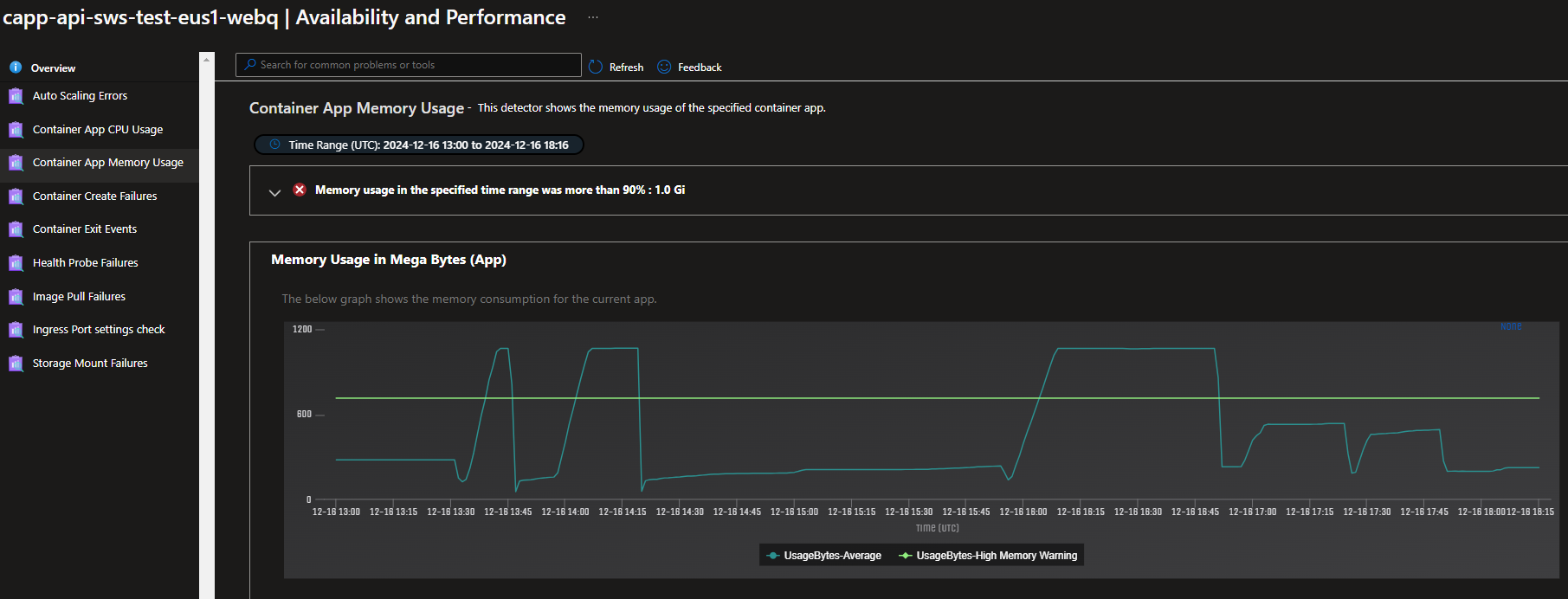
容器的内存使用量大致随上传文件的大小增长,最终导致容器内存耗尽(见截图)。原本以为直接流式传输到文件存储只会占用流缓冲所需的内存。
已尝试的解决方案
代码基本遵循ASP.NET Core文件上传文档中的示例,区别在于:1)为简化测试减少了部分校验;2)由于实际代码需将流传递给客户端库进行解压、处理等操作,因此必须处理文件上传流。该代码引发了上述内存问题。
/// <summary>
/// Adds a new Document
/// </summary>
[HttpPost("test", Name = nameof(AddDocumentAsync))]
[DisableFormValueModelBinding]
[DisableRequestSizeLimit]
[ProducesResponseType(StatusCodes.Status201Created)]
[ProducesResponseType(StatusCodes.Status400BadRequest)]
public async Task<ActionResult> AddDocumentAsync()
{
    if ( !HttpContext.Request.HasFormContentType )
        return BadRequest("No file uploaded.");
    string boundary = HttpContext.Request.GetMultipartBoundary();
    if ( string.IsNullOrEmpty(boundary) )
        return BadRequest("Invalid multipart form-data request.");
    MultipartReader multipartReader = new MultipartReader(boundary, HttpContext.Request.Body);
    MultipartSection? section = await multipartReader.ReadNextSectionAsync();
    if ( section == null )
        return BadRequest("No file found in request body.");
    FileMultipartSection? fileSection = section.AsFileSection();
    if ( fileSection?.FileStream == null )
        return BadRequest("Invalid file.");
    string tempDirectory = Path.GetTempPath();
    string tmpPath = Path.Combine(tempDirectory, Path.GetRandomFileName());
    using ( FileStream fs = new FileStream(tmpPath, FileMode.Create) )
        await fileSection.FileStream.CopyToAsync(fs);
    return Created();
}
观察到/tmp目录下的文件在增长,但内存使用量也以大致相同的速率增长。
如果将目标改为直接将fileSection.FileStream流式传输到Blob存储而非本地文件,则不会出现内存问题。
还尝试使用最小API并通过模型绑定IFormFile。根据文档,默认情况下,文件超过64k时会缓冲到磁盘,这正是我需要的。看到/tmp目录下的文件在增长,但该方案同样导致内存使用量同步增长。
尝试为容器挂载存储卷,怀疑容器因缺少挂载存储卷而使用内存。将Azure Files实例挂载到/blah,并将临时文件的目标路径从/tmp改为/blah。文件正确流式传输到Azure Files存储实例,但内存问题仍然存在。
最后,在Azure Web Services应用中运行上述代码,未观察到内存增长问题;在本地运行应用时,系统或进程内存也未出现Azure Container App中的增长情况。
更新: 根据反馈,还尝试从Blob存储下载文件到容器应用,这同样导致容器内存使用量随下载文件大小增长。使用的代码片段如下:
[HttpGet("test", Name = nameof(TestDocumentAsync))]
[ProducesResponseType(StatusCodes.Status200OK)]
public async Task<ActionResult> TestDocumentAsync()
{
    string tempDirectory = Path.GetTempPath();
    string tmpPath = Path.Combine(tempDirectory, Path.GetRandomFileName());
    BlobClient blobClient = _blobContainerClient.GetBlobClient("c1f04a61-5ec3-43a8-b7ad-de51ae5185bb.tmp");
    using ( FileStream fs = new FileStream(tmpPath, FileMode.Create) )
        await blobClient.DownloadToAsync(fs);
    return Ok();
}
问题
我认为自己可能误解或误用了某些机制。在Azure Container Apps与ASP.NET环境中,将大体积(1GB至更大)multipart/form-data文件上传到临时存储进行处理并在后续删除的正确方式是什么?或者如何解释即使是简单的Blob存储下载操作也会导致内存增长的现象?
内容的提问来源于stack exchange,提问作者Tyler Southard


